Auto Totem+ Addon: Auto-Equip Totems in Bedrock
Auto Totem+ automatically re-equips Totems of Undying from your inventory when consumed. Stay protected across all dimensions with real-time warnings.
Created by FleetMc Studio
What Is Auto Totem+ and Why You Should Care
Auto Totem+ is a behavior pack addon that automatically re-equips Totems of Undying from your inventory whenever your current totem is consumed. If you've ever died because you forgot to manually swap a fresh totem into your offhand slot—or worse, watched your health bar drain while fumbling through your inventory—this addon solves that problem instantly.
Created by FleetMc Studio, this isn't just a convenience feature; it's a genuine quality-of-life improvement that transforms how you approach survival gameplay. Whether you're deep in a dangerous cave system, fighting a Warden, or navigating the Nether, you'll always have a totem ready without lifting a finger.
How Auto Totem Works in Minecraft Bedrock
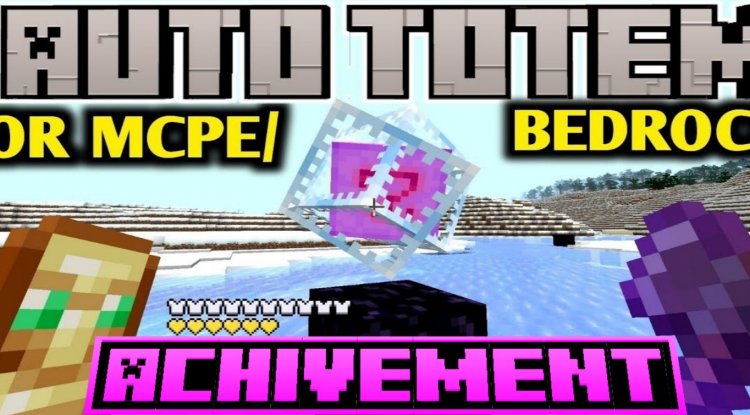
The magic happens behind the scenes through an intelligent detection system. When your equipped Totem of Undying activates and saves you from death, the addon immediately searches your inventory for a replacement. If one exists, it automatically places the new totem into your offhand slot—all within milliseconds. You respawn or recover from the damage without ever being vulnerable.
The system is smart enough to respect your other equipment priorities too. If you're holding a shield or other crucial offhand item, the addon won't blindly replace it. It knows when you actually have totems available and prioritizes your survival without creating inventory conflicts.
Real-Time Totem Tracking and Color-Coded Warnings
Beyond automatic re-equipping, Auto Totem+ keeps you constantly informed about your totem supply. The action bar displays your remaining totem count with live updates, so you always know exactly how many lives you have left. This intel matters—especially when you're planning risky plays or deciding whether to venture into particularly dangerous territory.
The warning system uses an intuitive color scheme:
- Green: You're sitting pretty with 5 or more totems—go forth and conquer
- Yellow: 3-4 totems remaining—time to be more cautious or find a safe place to craft more
- Red: Below 3 totems—you're running dangerously low and should prioritize crafting or finding a safe zone
Paired with these visual warnings are notification sounds that correspond to your totem stock level, giving you audio cues even when you're not staring at the action bar.
Advanced Features for Complete Control
This addon gives you surprising depth of customization for what seems like a simple concept. An interactive in-game menu—accessible through a renamed stick item—lets you adjust settings on the fly without leaving your world. You can enable or disable the auto-equip system entirely, toggle notifications, and fine-tune the experience to match your playstyle.
For those who prefer command-line control, chat commands are also available for toggling the system on and off. This flexibility means you can have Auto Totem+ active during intense exploration and disable it during casual building sessions if you prefer.
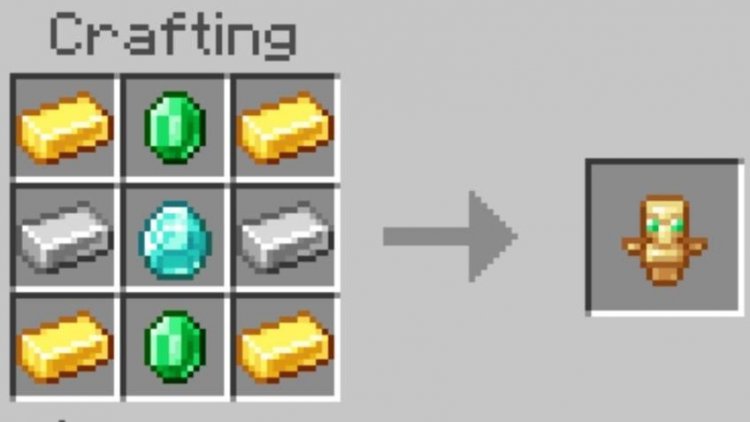
There's also a bonus feature many players overlook: the addon includes a craftable Totem of Undying recipe for survival mode. This means you're not entirely dependent on looting them from Evokers—you can set up a sustainable crafting system and never worry about running out.
Installation and Compatibility Across All Platforms
Getting Auto Totem+ running is straightforward. Since it's a behavior pack addon that doesn't require Script API or experimental features, installation is hassle-free. Download the addon file, import it into Minecraft Bedrock Edition, then enable it in your world settings. The addon works seamlessly on Android, iOS, Windows, and console platforms.
Compatibility is excellent. Whether you're playing singleplayer, multiplayer, on Realms, or a custom server, Auto Totem+ functions without interference. It also plays nicely with other addons, so you can layer it on top of your existing collection without conflicts. Importantly, using this addon doesn't disable achievements, so you're free to pursue those progression goals guilt-free.
Who Should Install This Addon?
If you're a casual survival player, Auto Totem+ transforms your experience by removing a frustrating layer of inventory management. If you're a hardcore enthusiast or speedrunner, the reliability and real-time tracking become strategic tools. PvP-focused players love it because it eliminates the split-second delay of manual equipping. Even builders appreciate the peace of mind when exploring new areas.
The addon works across all dimensions, so whether you're in the Overworld, Nether, or End, your totem protection never wavers. This consistency is why many players consider it essential rather than optional.
How to Install Auto Totem+
Installation takes just a few steps:
- Download the Auto Totem+ addon file from a trusted source
- Open the .mcpack file (it should launch Minecraft automatically)
- Select "Import" when prompted, confirming you want to add it to your game
- Create a new world or open an existing one
- Go to world settings and find the Behavior Packs section
- Locate Auto Totem+ in the available packs and enable it
- Save your settings and load into the world
That's it. No configuration files to edit, no experimental toggles to enable, no complex setup required.
Frequently Asked Questions
Does Auto Totem+ work on multiplayer servers and Realms?
Yes, it works perfectly on multiplayer servers, Realms, and local multiplayer worlds. All players who have the addon installed will benefit from the auto-equip system in shared worlds.
Will using Auto Totem+ disable my achievements?
No, this addon is achievement-safe. You can use it without worrying about locking yourself out of progression goals or accomplishments.
Can I disable Auto Totem+ mid-game if I want to play without it?
Absolutely. You can toggle the system on and off through the in-game menu or chat commands at any time, even in the middle of a session. No world restart needed.
What happens if I don't have any totems in my inventory when one is consumed?
The addon simply can't equip what doesn't exist. If your inventory is completely empty of totems, you'll be left without one in your offhand until you obtain more through crafting or looting.
What's Your Reaction?












![Patrix Resource Pack For 1.19 [32x→256x]](https://minecraftmodded.com/uploads/images/202210/image_750x415_6343b3ab59eff.jpg)


