Pudun Craft: Best MCPE Addon for Cozy Straw Furniture
Pudun Craft adds customizable straw seating to Minecraft Bedrock. Sit, age, wax, and cushion Puduns for unique rustic decor and gameplay benefits.
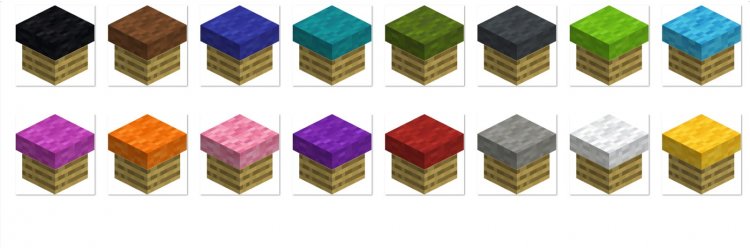
Created by Li hua
Pudun Craft: Cozy Straw Seating That Actually Changes How You Play
Pudun Craft is a Minecraft Bedrock addon that introduces cylindrical straw furniture called Puduns—interactive seating items you can craft, customize with colored cushions, and watch naturally age over time. Created by Li hua, this addon transforms how players approach both decoration and survival mechanics by blending rustic aesthetics with surprising gameplay depth.
If you've ever wanted your Minecraft base to feel like a cozy farmhouse where you can actually sit down and enjoy a meal, Pudun Craft delivers exactly that experience. But it's far more than just furniture—the system includes aging mechanics, waxing, restoration, and hidden bonuses tied to eating near campfires. We've spent time with this addon and discovered why it's become one of the most creative additions to best MCPE addons 2026.
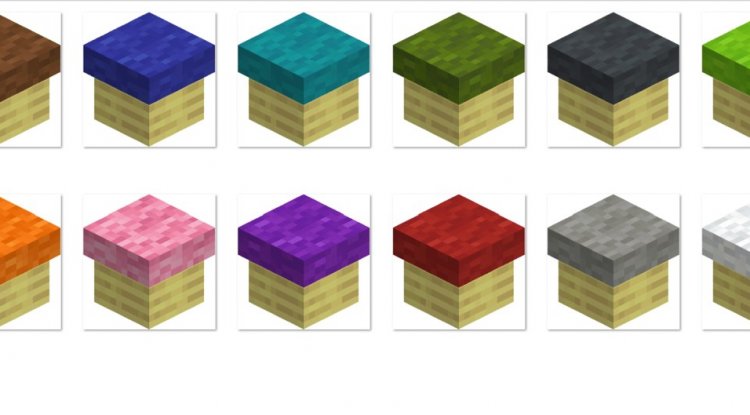
Photos by Li hua
What Makes Pudun Craft Stand Out Among Best Minecraft Addons
When scrolling through what are the best minecraft addons, most furniture mods offer static decorative blocks. Pudun Craft refuses to stay still. Every Pudun you place begins a four-minute countdown to becoming an Old Pudun—a weathered, aged version that looks distinctly different. This isn't a bug or annoying decay mechanic; it's the foundation of a satisfying progression system.
The genius lies in player agency. Want to freeze a Pudun at its current age? Apply honeycomb to wax it. Need to restore an ancient-looking Old Pudun? Submerge it in water, then bake it in a furnace. It's the kind of crafting loop that makes you feel like you're actually managing your furniture collection rather than just placing blocks and moving on.
Beyond aesthetics, Puduns grant tangible gameplay benefits. Sitting on one grants Regeneration I, while cushioned versions upgrade that to Regeneration II. Pair this with eating near lit campfires, and you're looking at double hunger and saturation restoration—a significant survival advantage that rewards players for building cozy gathering spaces.
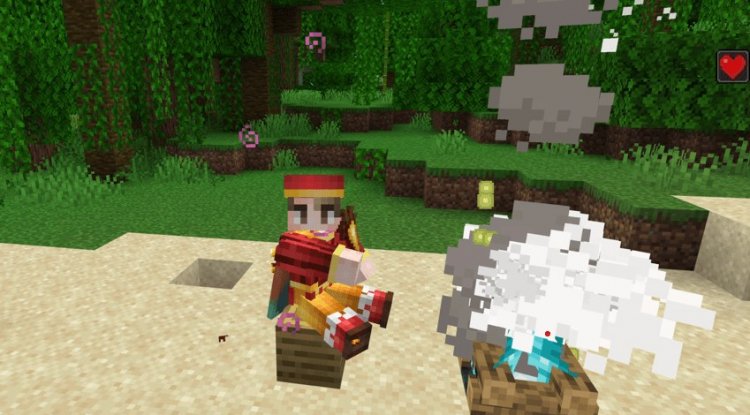
Crafting and Customizing Your Puduns: Core Mechanics
Getting started is straightforward. Each Pudun requires six wheat or tall dry grass plus one string—ingredients most players stumble upon naturally during early game. This accessibility means you can decorate immediately without grinding rare materials.
The real fun begins once a Pudun is placed. Right-click to sit (press sneak or jump to stand). Right-click while sneaking to invite nearby mobs to join you—yes, you can have animals sitting on furniture with you, which opens up hilariously charming screenshot opportunities.
To add personality, right-click your Pudun while holding wool blocks. Colored wool adds cushions that transform the look and boost the Regeneration effect. Use shears to remove cushions and recover string plus carpet scraps. Here's where Sharpness enchantments shine: Efficiency levels on your shears increase string yield and reduce carpet drops, rewarding players who prepare properly.

The Aging System: Weathering and Restoration Explained
Pudun Craft's aging mechanic is where casual players meet emergent gameplay. Four minutes after placement, any unwaxed Pudun transforms into an Old Pudun with a weathered appearance. This happens automatically and continuously unless you prevent it with honeycomb.
Waxing feels important and intentional—you're preserving a moment in time. Want an aged, rustic look? Let it happen naturally. Prefer pristine furniture? Keep the honeycomb handy. To unwax, use a Blaze Rod. To restore Old Puduns, the process is elegant: submerge them in water (they absorb moisture), then place them in a furnace. The heat dries them out and returns them to their original state.
This system encourages building near water and using furnaces strategically. It's not just about looks—it's about understanding the addon's ecology and planning your base accordingly.
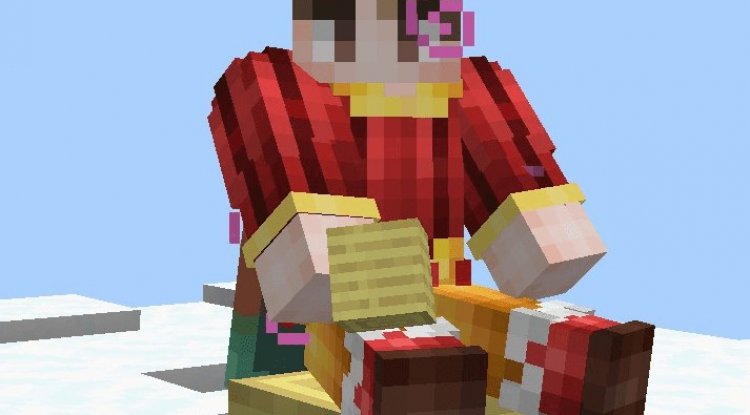
Hidden Gameplay Bonuses: Campfires and Hunger Restoration
Here's why Pudun Craft ranks among the best mcpe addons 2026 beyond pure decoration: the hunger mechanics. When you eat while seated within five blocks of a lit campfire, you restore double hunger and saturation. Position your Puduns near a campfire cooking station, and you've created an efficient survival hub.
Soul Campfires add another layer—eating near them while seated spawns experience orbs proportional to your food's nutrition value. Suddenly, building a cozy seating area isn't just atmospheric; it's economically superior to eating while standing. Players who optimize around this mechanic gain meaningful advantages in both survival and creative modes.
Language Support and Creator Respect
Li hua designed Pudun Craft with international players in mind. The addon supports both English and Chinese with automatic language switching based on your game settings. That attention to detail—ensuring the interface feels native regardless of your language—elevates the experience.
Important note: Pudun Craft is for personal use. Commercial redistribution and monetized video content require author credit. If you're a content creator featuring this addon, a simple mention of Li hua in your description supports the creator and respects their work.
How to Install Pudun Craft on Your MCPE World
Installation is the standard process for best minecraft addons on Bedrock:
- Download the .mcaddon file
- Double-click to trigger the import dialog (or open from your downloads folder if the association isn't set)
- Minecraft will confirm the import—select your target world or select "Create New" if installing globally
- When creating a world, activate the addon in both Behavior Packs and Resource Packs tabs
- Load the world and search the creative inventory for "Pudun" to find your new blocks
The .mcaddon format bundles everything—behavior and resource packs together—so you don't juggle separate files. This is one reason Bedrock addons remain user-friendly compared to Java modding.
Frequently Asked Questions
Can I sit on Puduns with other players in multiplayer?
Yes, multiple players can occupy Puduns simultaneously. Each Pudun functions independently, so you can fill an entire seating area with friends or fellow survivors, all benefiting from the Regeneration effects.
Do Puduns work in Survival mode, or are they Creative-only?
Pudun Craft is fully integrated into Survival mode. You craft them from wheat and string, place them naturally, and gain all the hunger restoration bonuses. They're designed to enhance survival progression, not bypass it.
What happens if I don't wax my Puduns—do they disappear?
No, they transform into Old Puduns, which are fully functional. You can still sit on them and receive Regeneration effects. Aging is purely visual and mechanical restoration (via water and furnaces), not destruction. You're free to let them age if you enjoy the weathered aesthetic.
Can mobs actually sit on Puduns, or was that a joke?
Mobs can genuinely sit on Puduns! Right-click while sneaking to invite nearby creatures. It's primarily a cosmetic feature that creates charming moments—imagine screenshots of animals lounging around your campfire seating area.
Final Thoughts: Why Pudun Craft Deserves Your Attention
In a landscape crowded with what are the best minecraft addons suggestions, Pudun Craft stands out because it refuses to be purely decorative. The aging system, restoration mechanics, cushion customization, and campfire bonuses weave together into a cohesive design that makes players think about space, placement, and survival strategy.
Whether you're building a cozy farmstead, optimizing hunger restoration for hardcore survival, or simply want furniture that ages like fine wine, Pudun Craft delivers. It's the kind of addon that quietly improves your game without overwhelming it—exactly what the best MCPE addons 2026 should do.
What's Your Reaction?













![Patrix Resource Pack For 1.19 [32x→256x]](https://minecraftmodded.com/uploads/images/202210/image_750x415_6343b3ab59eff.jpg)


