Bosya's Selection Box Plus+ - Best MCPE Addons 2026
Discover Bosya's Selection Box Plus+, a lightweight Bedrock resource pack that matches block outlines to actual block shapes. Best MCPE addons for precision building.
Created by Bosya
Bosya's Selection Box Plus+: A Game-Changer for Bedrock Builders
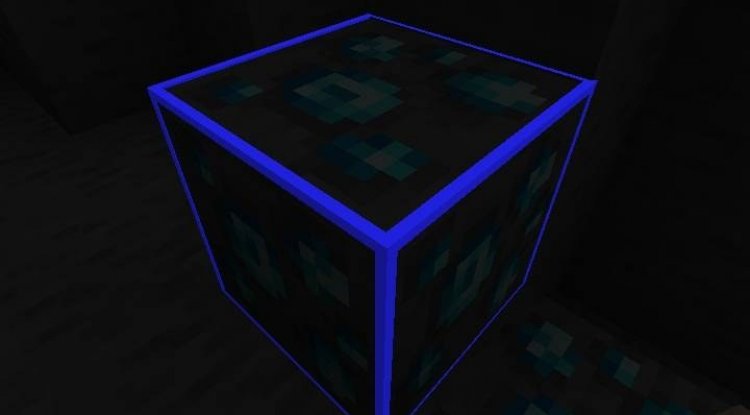
Bosya's Selection Box Plus+ is a lightweight Bedrock Edition resource pack that replaces the default block selection outlines with visually accurate shapes that match the actual geometry of individual blocks. If you've ever felt frustrated by the standard selection box that treats every block the same way, this addon offers a refreshingly practical solution that transforms how you interact with the building canvas in Minecraft MCPE.
For builders, redstone enthusiasts, and anyone who spends time carefully placing blocks, this quality-of-life improvement feels like one of those features that should have been in vanilla Minecraft all along. Let's dive into what makes this addon worth your download slot.
Why Selection Box Accuracy Matters in Minecraft Building
When you hover over a block in standard Minecraft Bedrock, you see a uniform outline box. This works fine for simple cubes, but the moment you place stairs, slabs, fences, or other non-cube blocks, that rectangular outline becomes misleading. You're left guessing where the actual block geometry ends and empty space begins.
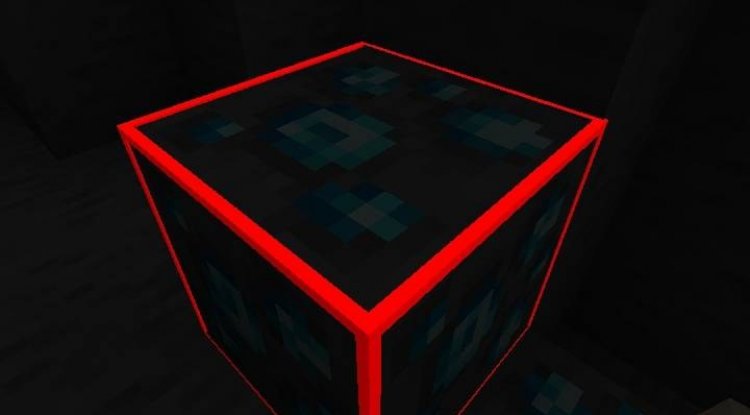
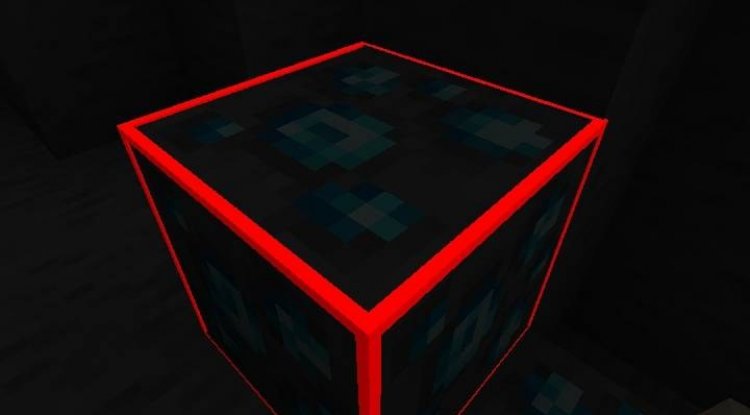
Bosya's Selection Box Plus+ solves this by rendering selection outlines that conform to the true shape of each block type. Placing a stair? You'll see the stair-shaped outline. Working with bottom slabs? The outline hugs the bottom half of the block space. This seemingly small change removes cognitive friction from the building process and helps you place blocks with confidence, especially when working on intricate architectural details or complex redstone contraptions.
The addon is particularly valuable if you're building structures that require precision—think decorative rooflines, detailed terrain work, or any project where block placement visibility matters.
Photos by Bosya
Feature Highlights of Bosya's Selection Box Plus+
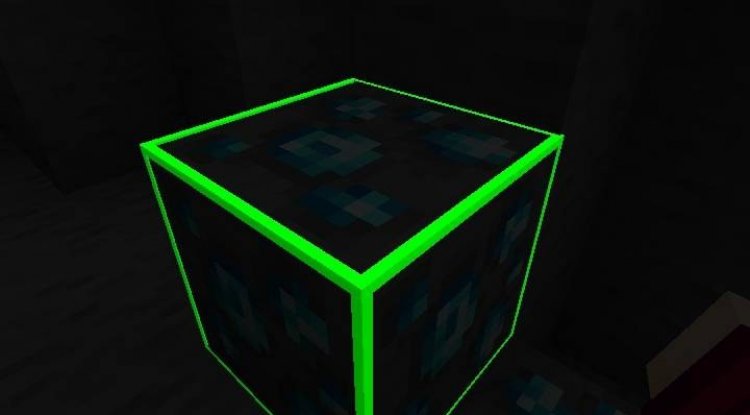
- Four color options: Choose between white, red, green, and blue selection outlines to match your preference or visibility needs
- Lightweight footprint: Minimal impact on performance, making it ideal for devices with limited resources
- Achievement-compatible: Enable the addon and earn achievements normally without restrictions
- No experimental features required: Works on standard Bedrock settings without Beta APIs or hidden toggles
- Accurate geometry rendering: Selection boxes respect stairs, slabs, walls, fences, and other non-standard block shapes
- Creator-friendly policies: You're permitted to showcase the addon in videos and streams with proper credit
Best Minecraft Addons 2026: Where Does This Fit?
When evaluating the best minecraft addons available today, it's easy to get caught up in massive overhaul packs that add new mobs, dimensions, or tools. While those addons certainly have their place, the truly excellent ones often focus on fixing small annoyances that affect your experience every single session.
Selection Box Plus+ exemplifies this philosophy. It's not flashy or feature-heavy, but it's useful—the kind of addon you'll miss the moment you disable it. For builders specifically, this ranks among the best MCPE addons because it directly improves your workflow without requiring you to learn new mechanics or settle for reduced performance.
The lightweight nature also means you can stack this addon alongside other quality-of-life improvements without worrying about compatibility issues or performance degradation. It plays nicely with other resource packs and behavior packs in most scenarios.
Understanding the Technical Setup: Resource and Behavior Packs
One important detail: Bosya's Selection Box Plus+ consists of both a resource pack component (which handles the visual outlines) and a required behavior pack. Both components need to be enabled in your world or realm for the addon to function properly.
The resource pack handles all the visual rendering of the new selection boxes, while the behavior pack works behind the scenes to ensure compatibility and proper functionality. This dual-pack approach, while requiring a slightly more involved setup than single-file addons, ensures stability and prevents conflicts with your existing Minecraft configuration.
Since the addon doesn't rely on experimental features or APIs that might break in future updates, you can expect it to remain functional across Minecraft Bedrock versions with minimal maintenance.
Important Creator Guidelines and Usage Rights
Bosya, the original creator, has established clear guidelines for using this addon. If you plan to showcase Selection Box Plus+ on YouTube, Twitch, or other platforms, you're free to do so—just include proper credit attribution to Bosya in your video description or on-screen.
You're also permitted to modify the addon files for personal use, which means you can tweak colors or settings to your exact preference. However, the addon cannot be distributed through monetized link services (those sketchy sites that make you click through ads before downloading), and re-uploading to third-party platforms without permission is prohibited. This protects both the creator's work and ensures the Minecraft community gets authentic, unmodified versions from trusted sources.
The addon is officially available through CurseForge and MCPEDL, the two primary platforms for legitimate Minecraft addons, so grab it from there.
How to Install Selection Box Plus+ on Your Bedrock World
Installing this addon is straightforward once you have the .mcpack files downloaded:
- Download both the resource pack and behavior pack files from CurseForge or MCPEDL
- Open Minecraft Bedrock Edition
- Navigate to Settings > Resource Packs and add the resource pack file
- Navigate to Settings > Behavior Packs and add the behavior pack file
- Create or open a world, then apply both packs before entering
- Launch your world and verify the selection boxes now show accurate block shapes
If you're using a realm, you'll need to upload the packs through the realm settings before inviting players. The installation process is identical to any standard .mcpack addon on Bedrock Edition.
Frequently Asked Questions About Selection Box Plus+
Will Selection Box Plus+ work on multiplayer servers or realms?
Yes, as long as the realm or server owner uploads the addon files to the world settings. All players will see the updated selection boxes once connected. However, some third-party servers may have restrictions on custom resource packs.
Can I change the selection box color after installing?
The addon comes with four built-in color options (white, red, green, blue). You can choose which color variant to download. If you want additional custom colors, you're permitted to modify the resource pack files yourself for personal use.
Does this addon cause lag or performance issues?
No. Bosya designed Selection Box Plus+ specifically to be lightweight, so performance impact is negligible even on lower-end devices. The addon only affects the visual rendering of selection boxes and doesn't add new gameplay elements or entity processing.
Is this addon compatible with Minecraft version 1.21.100 and newer?
Selection Box Plus+ was created for Bedrock v1.21.100. Compatibility with future versions depends on whether Minecraft's block selection systems change significantly. Since the addon doesn't rely on experimental features, it typically remains functional across version updates, but check the official pages for the latest compatibility information.
What's Your Reaction?












![Patrix Resource Pack For 1.19 [32x→256x]](https://minecraftmodded.com/uploads/images/202210/image_750x415_6343b3ab59eff.jpg)


