Sakura Prime Shader Pack: Japanese Cherry Blossom Aesthetics for MCPE
Sakura Prime is a PBR shader pack with Japanese sakura theme, featuring ACE tone mapping and balanced lighting. Created by Ferous Chara for Minecraft Bedrock.
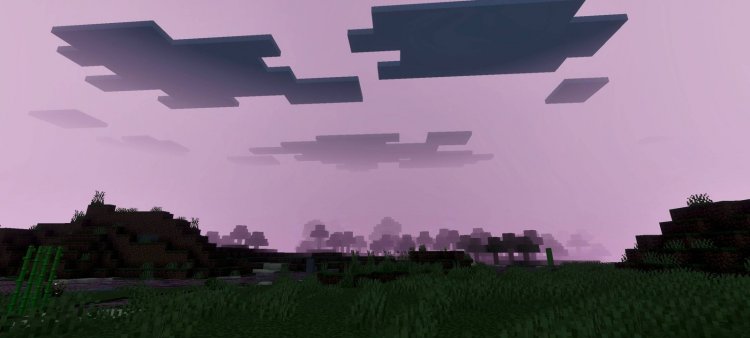
Created by Ferous Chara
Sakura Prime Shader Pack: Bringing Japanese Cherry Blossom Beauty to Minecraft Bedrock
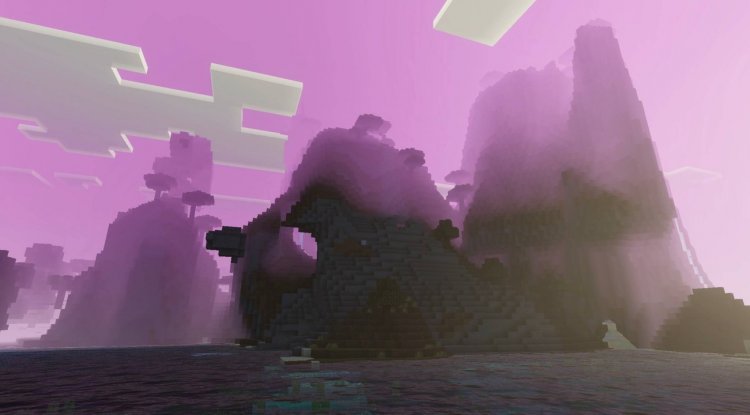
Sakura Prime is a shader pack designed with a Japanese cherry blossom theme that transforms Minecraft's visuals into a softer, more aesthetically peaceful experience. Created by Ferous Chara, this shader emphasizes realistic lighting balance and advanced rendering technologies rather than the extreme darkness or oversaturation common in many shader packs. If you're looking for a shader that feels serene without sacrificing visual fidelity, this one deserves your attention.
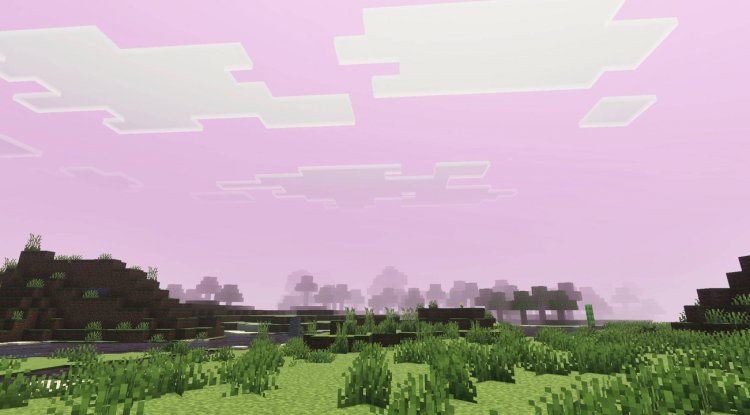
Photos by Ferous Chara
What Makes Sakura Prime Different From Other Shader Packs?
The shader landscape in Minecraft Bedrock can feel overwhelming. Countless options promise photorealism, dramatic shadows, and cinematic visuals—often at the cost of playability or that "Minecraft" feeling. Sakura Prime takes a different approach. Rather than chasing extreme realism, Ferous Chara designed this pack around a cohesive artistic vision: the quiet beauty of Japanese sakura (cherry blossom) gardens.
This thematic consistency influences every technical choice. The lighting system avoids the heavy shadows and dark cave interiors that plague many modern shaders. Instead, you get balanced illumination that keeps your world visible and explorable while still delivering meaningful visual enhancement. It's the difference between a shader that looks impressive in screenshots and one you actually want to play with for hours.
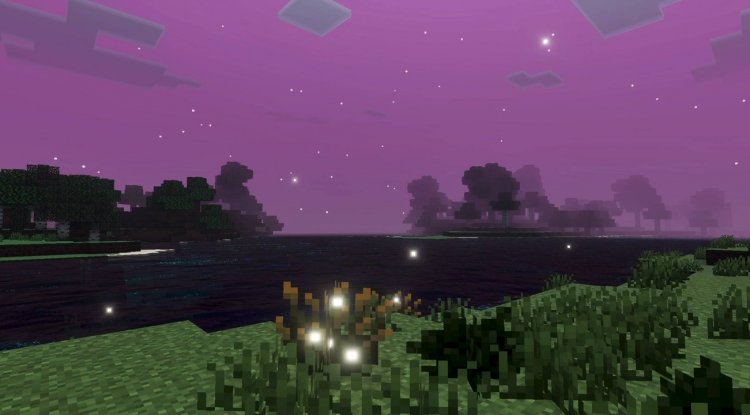
Core Features: PBR, ACE Tone Mapping, and Advanced Color Science
Sakura Prime leverages several advanced rendering technologies that work together to create its signature look:
- PBR (Physically-Based Rendering) Support: This foundation allows materials to respond to light in realistic ways. Grass, water, stone, and metal all behave according to actual physical properties rather than pre-baked textures.
- ACE Tone Mapping Technology: This color grading system compresses and balances your game's brightness values intelligently, preventing blown-out highlights and crushed shadows while maintaining vibrant colors.
- White Balance Temperature Adjustment: The shader can shift the overall warmth or coolness of your world, creating different moods and times of day with nuance.
- Complex Midtone Processing: The "middle" tones of your image (neither bright nor dark) receive special attention, resulting in details that pop without harsh contrast.
- Balanced Lighting Approach: Unlike shaders that plunge caves into near-total darkness, Sakura Prime maintains visibility and atmosphere simultaneously.
- Visually Peaceful Atmosphere: The cumulative effect is a serene, cohesive aesthetic that complements Minecraft's creative potential rather than overwhelming it.
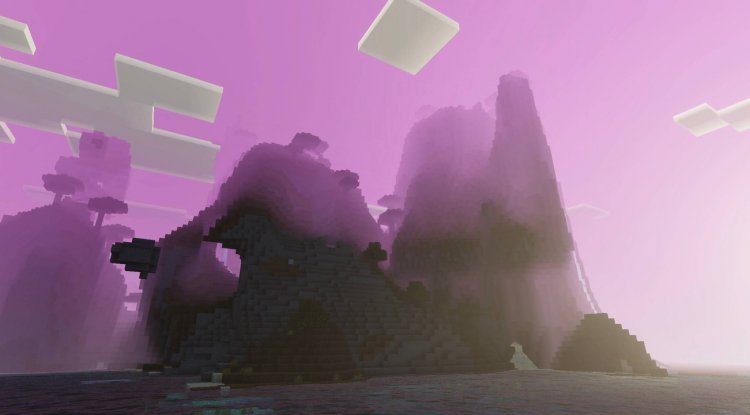
The Japanese Sakura Aesthetic: More Than a Theme
The cherry blossom theme isn't just window dressing. Japanese aesthetics are built on principles like wabi-sabi (finding beauty in imperfection and transience) and ma (the power of empty space). You see this reflected in Sakura Prime's design philosophy. The shader doesn't overcomplicate your world with unnecessary effects or aggressive post-processing. Instead, it creates breathing room—literally in how light interacts with space, and philosophically in how it respects the original Minecraft aesthetic while enhancing it.
This approach makes Sakura Prime excellent for building projects, especially those with Japanese-inspired architecture. The soft lighting brings out the detail in wooden structures, stone pathways, and water features without the color grading washing everything out. Whether you're creating a zen garden, a traditional village, or a sakura tree grove, this shader amplifies the mood you're already building toward.
Performance and Playability: Can You Actually Game With This?
A gorgeous shader means nothing if your device throttles into single-digit framerates. Sakura Prime's balanced approach extends to performance optimization. By avoiding computationally expensive shadows, overly complex water simulations, or heavy screen-space effects on lower-end devices, the pack remains playable on a broader range of hardware.
That said, you'll want a reasonably modern device to experience it fully. This isn't a "ultra-light shader for old phones" package—it's a substantive visual upgrade that respects performance without cutting corners. On mid-range to high-end Bedrock devices, you should see smooth gameplay with draw distances of 16-20+ chunks.
Who Should Install Sakura Prime?
Creative builders and atmospheric players will find the most value here. If you spend time constructing, landscaping, or simply exploring with an eye for beauty, this shader amplifies that experience. The balanced lighting keeps you immersed without the "shader fatigue" that comes from oversaturated or hyper-contrasty packs.
Survival players should also consider it. Unlike some shaders that sacrifice visibility for drama, Sakura Prime keeps your world functional. You can still see mobs approaching, mine effectively in caves, and navigate at night without cranking your brightness slider.
Content creators looking for a visually striking but cohesive aesthetic will appreciate the cinematic quality without the artificiality. Screenshots and videos rendered with Sakura Prime feel like they're from the same world, not a dozen conflicting visual styles.
How to Install Sakura Prime on Minecraft Bedrock
Installing shader packs in Minecraft Bedrock (MCPE, Windows 10/11, console, etc.) follows a standardized process:
- Download the Sakura Prime .mcpack file to your device.
- Open the file (on most devices, this automatically launches Minecraft and prompts installation).
- Confirm the installation when Minecraft displays the resource pack dialog.
- Open a world or create a new one.
- Enter the world's settings and navigate to the "Resource Packs" section.
- Activate Sakura Prime by moving it from "Available" to "Active" packs.
- Confirm and relaunch the world if needed.
Note: Some devices may require manual folder installation. If the automatic method doesn't work, place the .mcpack file in your device's resource packs folder (usually located in your Minecraft com.mojang directory).
Frequently Asked Questions About Sakura Prime
Is Sakura Prime compatible with texture packs?
Yes. Sakura Prime is a shader pack, which is a separate layer from texture packs. You can layer them together—many players combine this shader with Japanese-themed texture packs for a cohesive look. Load the texture pack first, then the shader on top.
Will Sakura Prime work on older devices or lower-end phones?
Older or budget devices may struggle. Sakura Prime is designed with modern hardware in mind. If you have a phone or tablet from the last 2-3 years with at least 3GB of RAM, you should be fine. Very old devices may need lighter shader alternatives.
Can I use Sakura Prime in multiplayer worlds?
Shader packs are client-side only, meaning they affect your view without changing the server or other players' experiences. You can absolutely use it in multiplayer—only you will see the Sakura Prime visuals. Note that the server itself must be running on compatible Bedrock infrastructure.
How does Sakura Prime compare to other balanced shaders?
Many shaders claim balance but still lean toward drama or extreme realism. Sakura Prime's advantage is its cohesive artistic direction. Instead of trying to be "photorealistic" (which Minecraft isn't and shouldn't be), it pursues a specific aesthetic vision. That focused approach creates a more satisfying experience than packs that try to do everything.
What's Your Reaction?








![Default [32x] MCPE PvP Texture Pack: A Comprehensive Review](https://minecraftmodded.com/uploads/images/202309/image_650x433_65020dad07006.jpg)





![Patrix Resource Pack For 1.19 [32x→256x]](https://minecraftmodded.com/uploads/images/202210/image_750x415_6343b3ab59eff.jpg)


