White 3D Outline Texture Pack for Minecraft Bedrock
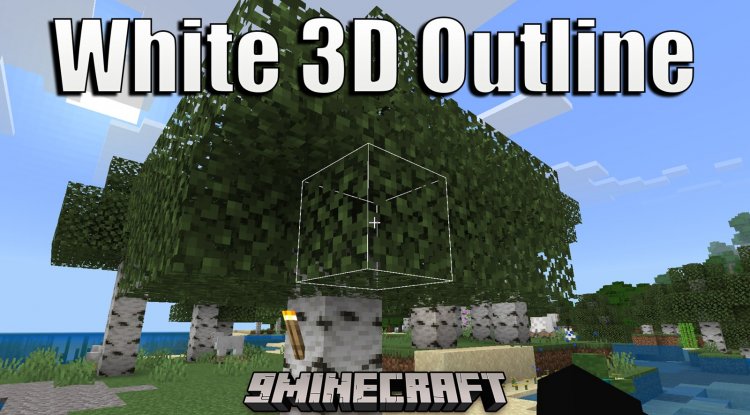
Replace Minecraft's default black selection box with a white 3D outline. Improve block visibility and aesthetics with this lightweight Bedrock texture pack.
Created by Aizhu
White 3D Outline: The Texture Pack That Makes Block Selection Pop
The default black selection box in Minecraft Bedrock Edition does its job, but let's be honest—it's not particularly stylish or always easy to spot against darker blocks. White 3D Outline is a lightweight texture pack that replaces the standard black selection box with a crisp white 3D outline, dramatically improving visibility and giving your game a cleaner, more polished look. Created by Aizhu, this pack proves that sometimes the best quality-of-life improvements come from the smallest changes.
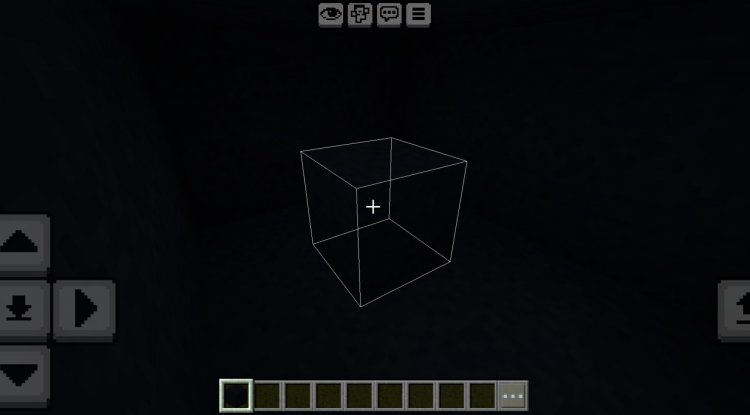
Photos by Aizhu
Why Get a White 3D Outline in Minecraft?
If you've ever found yourself squinting at your screen trying to figure out which block you're actually pointing at—especially in caves or at night—you're not alone. The vanilla selection box works, but it's subtle, and that subtlety can cost you precious seconds when you're building or mining. A white 3D outline solves this problem elegantly. The white color contrasts beautifully against nearly every block type, and the 3D effect adds depth perception that makes it immediately clear which block you're targeting. It's the kind of texture pack that makes you wonder why Mojang didn't think of it first.
Beyond practicality, there's an aesthetic appeal too. The white outline feels more modern and refined than the default black box. If you're a builder who cares about the visual experience—even the small details—this pack will make your gameplay feel more polished from moment one.
How to Get a 3D Skin and Visual Enhancements: Understanding the Difference
Before we go further, let's clarify something: this pack doesn't change your player skin (that's a separate thing entirely—if you want to know how to make 3D hair in minecraft or how to get a 3D skin in minecraft, you'll need to explore custom skin creators or skin packs separately). What the White 3D Outline pack does is enhance your visual experience by improving how you interact with the world. It's about the environment, not your avatar.
Think of it as complementary to other visual upgrades. You might pair this with shaders for better lighting, a detailed texture pack for richer block textures, or custom skins for your character. White 3D Outline handles the selection interface so you can focus on the other elements that make your world feel uniquely yours.
How to Make 3D Selection Boxes: What This Pack Does Differently
The technical magic here is straightforward but effective. Standard Minecraft uses a flat, black outline to show which block you're selecting. The White 3D Outline pack replaces the texture files that control this selection box, swapping the color to white and adjusting the rendering to create depth. The result is an outline that feels three-dimensional and far more visually distinct.
What makes this approach better than just changing the color is the 3D effect itself. A simple white line would help with visibility, but the dimensional treatment elevates it. You get better spatial awareness of your target block, which is especially useful when placing blocks at precise angles or mining in tight spaces.
Key Features and Performance Impact
- White color replaces default black selection box for superior contrast
- 3D outline appearance adds depth and visual clarity
- Significantly improves block selection visibility in all lighting conditions
- Maintains 100% vanilla gameplay—no balance changes or feature additions
- Minimal file size with virtually no performance impact
- No behavior pack required—purely a texture replacement
- Fully compatible with RenderDragon renderer
- Works seamlessly in multiplayer mode and on Minecraft Realms
- Supports the latest Minecraft Bedrock Edition versions (1.26+)
- Achievements remain enabled—this pack doesn't disable them
One of the best things about this pack is what it doesn't do. It doesn't bog down your device, it doesn't require you to disable achievements, and it doesn't need a paired behavior pack to function. Just drop it into your world settings and go. It's the definition of a focused, purposeful texture pack that does one thing exceptionally well.
Compatibility and Multiplayer Considerations
Whether you're playing solo in a personal world, collaborating with friends, or logged into a Realm, the White 3D Outline pack works flawlessly. Since it's purely visual on the client side, other players don't need the pack installed to play with you—you'll just see the enhanced selection boxes while they see their default ones. This makes it perfect for servers and shared worlds where not everyone wants to install the same texture packs.
The pack is tested on modern versions of Minecraft Bedrock Edition, including 1.26 and later releases. The RenderDragon renderer, which handles Bedrock's graphics, displays the white outline beautifully, whether you're on Windows, mobile, or console.
How to Install the White 3D Outline Pack
Installing texture packs on Bedrock is straightforward. You'll download the .mcpack file and open it with Minecraft Bedrock Edition. The game automatically imports it and adds it to your texture pack list. From there, you can apply it to any world by opening world settings, navigating to the resource packs section, and toggling the White 3D Outline pack to active. If you want to use it with other packs, make sure the White 3D Outline is positioned above any other selection-box-modifying packs in your stack.
The installation is the same across Windows 10/11, mobile devices, and consoles—just open the file and let Minecraft handle the rest.
Creator Support and Community
This pack was created by Aizhu, who actively supports the community through YouTube, TikTok, and a dedicated Discord server. If you have questions, suggestions, or run into issues, Aizhu maintains an approachable community where you can get help. Plus, if you enjoy this pack, Aizhu has created several other texture packs worth exploring, each with the same attention to quality and detail.
FAQ: White 3D Outline Texture Pack
Does the white 3D outline pack work with shaders?
Yes, this texture pack is compatible with shaders. Since it modifies a basic texture rather than altering rendering behavior, shaders will display the white outline as intended. The visual quality may vary slightly depending on the shader, but functionality remains intact.
Will this pack disable my achievements?
No. Texture packs are purely cosmetic changes that don't affect achievement eligibility. You can use White 3D Outline and continue unlocking achievements normally.
Can I use this pack on a multiplayer server?
Absolutely. Since it's a client-side texture replacement, other players won't be affected by it. You'll see the white outline while others see the default selection box. This makes it ideal for servers and Realms where players have varying texture pack preferences.
What's the file size and will it slow down my device?
The White 3D Outline pack has a minimal file size and negligible performance impact. It replaces a single texture element, so even low-end devices won't experience frame rate drops or loading delays.
What's Your Reaction?













![Patrix Resource Pack For 1.19 [32x→256x]](https://minecraftmodded.com/uploads/images/202210/image_750x415_6343b3ab59eff.jpg)


