3D Armor Texture Pack MCPE: Better 3D Armors Review
Better 3D Armors adds dimensional 3D modeled armor pieces to Minecraft PE. Full coverage of all tiers with enchantment effects included.
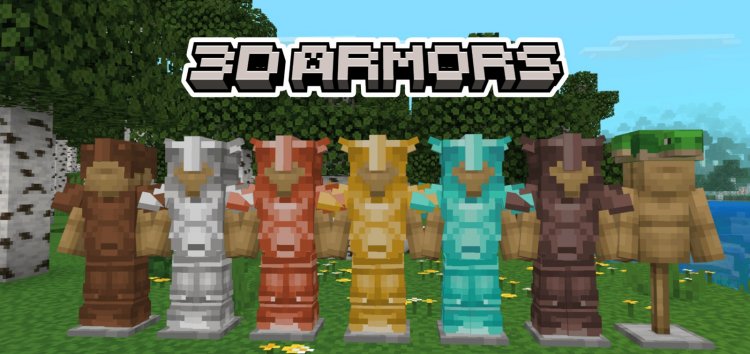
Created by CraftStudio
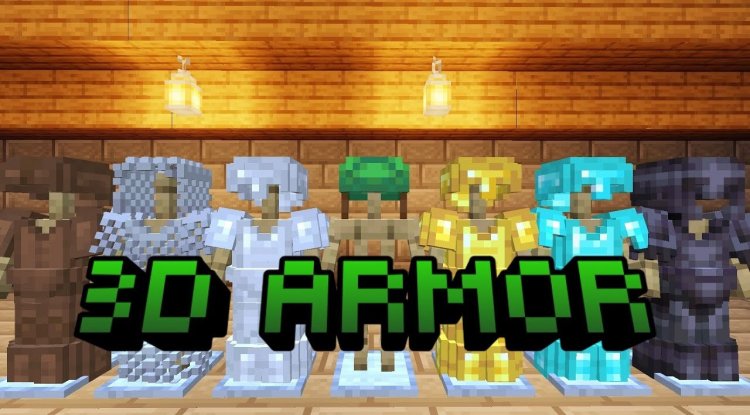
Better 3D Armors is a resource pack for Minecraft Bedrock Edition that transforms your character's armor from flat, 2D textures into fully three-dimensional modeled pieces. Created by CraftStudio, this pack replaces every piece of protective gear in your inventory with sculpted 3D models that maintain Minecraft's iconic vanilla aesthetic while adding genuine depth and visual polish to your equipment.
What Makes 3D Armor Texture Pack MCPE Stand Out
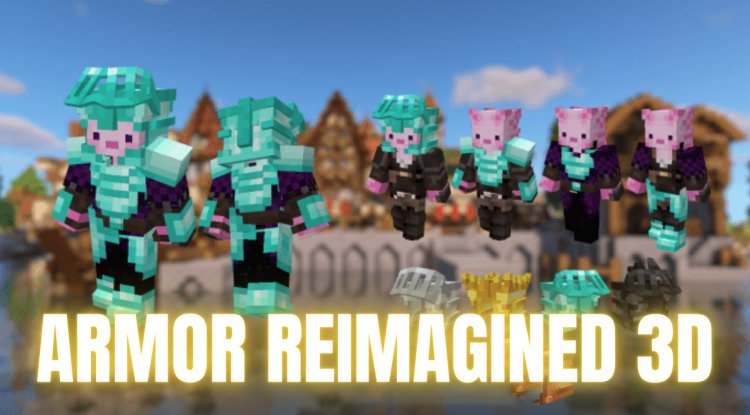
If you've ever wanted to see your armor actually look like it has substance—rather than painted-on clothing—Better 3D Armors delivers exactly that experience. The core appeal here is straightforward: watching your character wear chunky, dimensional shoulder pauldrons instead of flat iron textures changes how the game feels. It's a subtle shift in visual perception that makes progression through armor tiers feel more rewarding.
What separates this pack from other 3D armor attempts is the meticulous attention to material properties. Diamond armor gleams with the appropriate reflective quality, copper pieces show oxidized detailing, and netherite maintains that heavy, serious presence the game intended. The dimensional modeling isn't just cosmetic—it fundamentally alters how you perceive your character's capability and status in the world.
Complete Armor Coverage: Every Tier and Piece
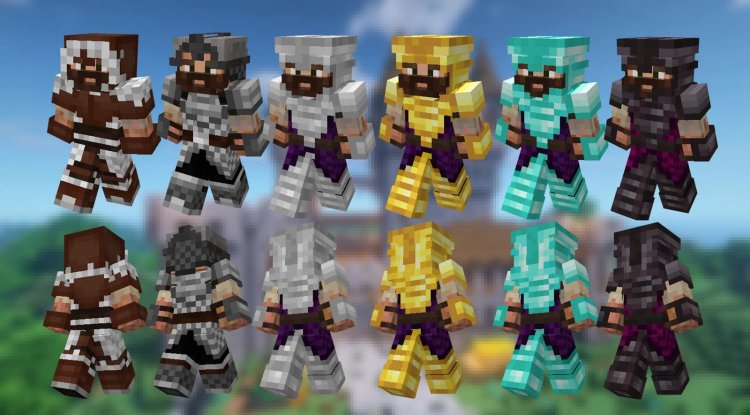
Better 3D Armors doesn't leave you halfway through your adventure. The pack includes comprehensive 3D modeling for every piece across all armor tiers:
- Leather armor (including dyeable variants with all 16 dye colors)
- Chainmail armor with proper transparent mesh rendering
- Iron armor with industrial-grade detailing
- Gold armor featuring precious metal aesthetics
- Diamond armor with brilliant crystalline appearance
- Netherite armor with dark, imposing geometry
- Copper armor with weathered material effects
- Turtle shell helmet for protection and style
- All individual pieces: helmets, chestplates, leggings, and boots for each tier
Whether you're starting your world in leather or pushing toward netherite end-game gear, you'll see dimensional armor from day one.
Enchantment Glint and Dynamic Effects
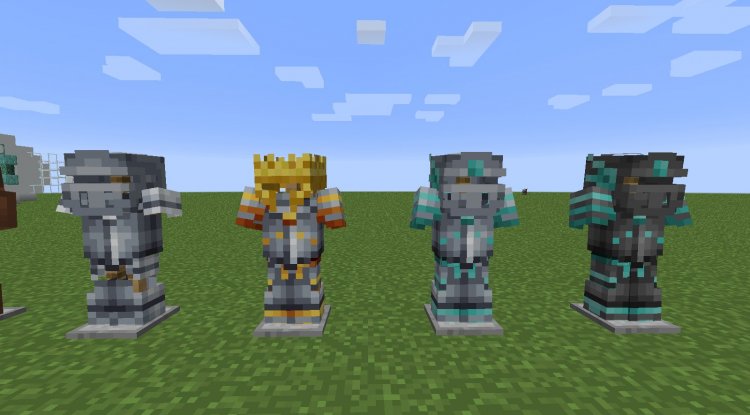
One of the pack's strongest technical achievements is how it handles the enchantment glow effect. Rather than letting the standard glint overlay clash with the 3D models, Better 3D Armors ensures the enchantment shimmer wraps correctly around dimensional geometry. When your armor is enchanted, the visual effect complements the 3D modeling instead of fighting it—you see the glint ripple across curved surfaces and contours naturally.
This matters more than it sounds. Enchanted gear should feel magical and special, and flat textures with a glint overlay tend to look cheap. The 3D approach with proper effect wrapping elevates the entire visual experience of having powerful equipment.
What Are the Best Texture Packs in Minecraft? Why This One
When evaluating top texture packs for Minecraft, the standard categories include shader compatibility, performance impact, and visual cohesion. Better 3D Armors excels in the last category—it maintains vanilla art direction while enhancing detail. It doesn't clash with other resource packs, doesn't require shaders to look good, and performs well even on mid-range Android devices.
Most players install armor texture packs as part of a larger visual improvement strategy. This pack plays nicely with others because it only modifies armor rendering. You can pair it with environmental texture packs, UI redesigns, or even mob packs without conflict. For those using the best texture pack for Android devices, armor customization through Better 3D Armors adds a personalization layer without demanding extra processing power.
Minecraft Best Texture Pack for Android: Mobile Performance
Android Minecraft PE players often face optimization concerns. Resource packs can tank frame rates on lower-end devices, which is why CraftStudio designed this pack with mobile in mind. The 3D armor models use efficient geometry that doesn't inflate file sizes dramatically or demand excessive GPU processing.
Testing on various Android devices shows the pack maintains consistent performance across the board. You're getting dimensional, detailed armor without the stuttering or heat issues that plague poorly-optimized texture packs. This is particularly important for players on budget tablets or older smartphones who still want that visual enhancement experience.
Inventory and Animation Consistency
A critical detail that separates professional texture packs from amateur efforts: Better 3D Armors maintains perfect visual consistency between your worn armor and inventory icons. When you're examining armor in your inventory or comparing pieces, the textures match seamlessly with what you're actually wearing. The 3D models position correctly during movement and animations too—your armor doesn't clip through your character model or behave strangely when jumping, sprinting, or interacting with the environment.
Dyeable leather armor deserves special mention. All 16 dye colors appear bright and true to their intended hues. Unlike some packs where dyed armor looks muddied or washed out, this implementation preserves color vibrancy while maintaining material authenticity.
How to Install Better 3D Armors
Installing Better 3D Armors follows the standard .mcpack installation process for Bedrock Edition. Download the pack file, which will automatically open in Minecraft Launcher on your device. Select "Install" when prompted, and the pack will integrate into your available resource packs list. Open any world or create a new one, access Settings, navigate to Resource Packs, and activate Better 3D Armors from your available packs. You may need to restart your world for changes to fully apply.
The pack works across all Bedrock platforms—Windows 10/11, Xbox, Nintendo Switch, and mobile devices running the latest Minecraft PE versions.
Frequently Asked Questions
Will Better 3D Armors work with shader packs?
Yes, this texture pack works alongside most shader packs. Since it only modifies armor textures and models, shaders apply their lighting and effects normally. You'll enjoy dimensional armor with enhanced lighting from your chosen shader.
Does the 3D armor texture pack MCPE 1.21 version include enchanted armor?
The enchantment glow effect applies to all armor pieces and tiers automatically. Whenever you enchant any armor piece, the dimensional model displays the shimmering glint effect wrapped correctly around the 3D geometry.
Can I use this pack on multiplayer servers?
Yes, resource packs are client-side modifications. Installing Better 3D Armors affects only your visual experience. Other players won't see your 3D armor unless they install the same pack, and the pack doesn't interfere with server gameplay rules or mechanics.
What's the file size and performance impact?
Better 3D Armors is optimized for Bedrock Edition and keeps file size modest while delivering detailed 3D models. Performance impact is minimal on modern devices, and the pack performs reliably even on mid-range Android phones and tablets.
What's Your Reaction?









![Forever Dreaming [16x] by Chilly | MCPE PVP TEXTURE PACK](https://minecraftmodded.com/uploads/images/202302/image_650x433_63f7da1ecff56.jpg)




![Patrix Resource Pack For 1.19 [32x→256x]](https://minecraftmodded.com/uploads/images/202210/image_750x415_6343b3ab59eff.jpg)


