Auto Collect Addon for Minecraft Bedrock - Auto Harvest Items
Auto Collect is a Minecraft Bedrock addon that automatically harvests items within 10 blocks. Customize ore, crop, and wood collection without cheats.
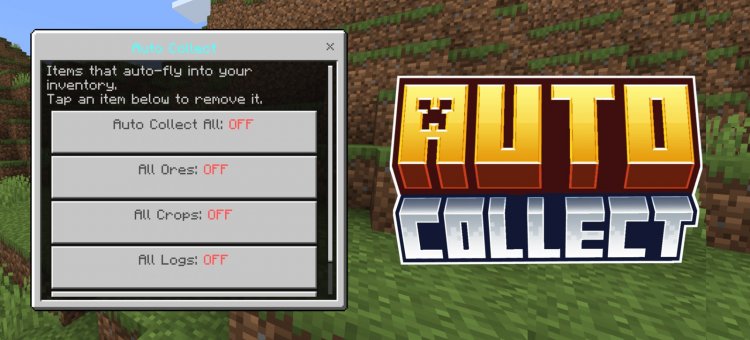
Created by voxenMC2
Auto Collect Addon for Minecraft Bedrock: Smart Item Harvesting Made Simple
Auto Collect is a Minecraft Bedrock addon that automatically gathers dropped items into your inventory when they land within a 10-block radius. Created by voxenMC2, this quality-of-life enhancement transforms how you interact with loot in survival mode, eliminating tedious manual collection while keeping your playthrough legitimate and achievement-compatible.

What Is Auto Collect and How Does It Change Your Gameplay?
If you've ever found yourself frantically running around a mining operation or farm gathering stray items one by one, you understand the friction point Auto Collect solves. This addon introduces passive item collection that respects your survival experience—no creative mode nonsense, no cheats required.
Unlike forced automatic collection systems, Auto Collect gives you granular control over what gets picked up. You decide whether coal finds its way into your inventory, whether diamonds are fair game, or whether you only want crops and logs collected. This flexibility means the addon adapts to your playstyle rather than forcing a one-size-fits-all approach.
The 10-block collection radius strikes a practical balance. Items within that range are quietly funneled to your inventory when they drop, but you're not passively collecting loot from across your entire base. It's close enough to feel natural during active gameplay—mining, farming, or combat—but distant enough that you retain some control over what you're doing.
How to Auto Harvest Ore With Automatic Ore Collection
Miners rejoice. Auto Collect includes dedicated ore collection toggles that let you automatically harvest diamonds, iron, gold, coal, emerald, and even the rare ancient debris without lifting a finger once they drop.
Imagine breaking into a diamond vein and watching your inventory fill automatically as each block drops its ore. No more frantic jumping around lava pools trying to catch falling diamonds before they burn. The ore collection system respects all variants and rarity levels, so whether you're strip mining or caving, your valuable drops are secured instantly.
Coal collection is particularly useful if you're running a large smelting operation. Instead of manually gathering coal dust from around furnaces and smokers, the addon intelligently collects it nearby. This small quality-of-life improvement compounds dramatically over long play sessions.
Auto Harvest Minecraft Farm Automation: Crops and Logs
Farming is where Auto Collect truly shines for Bedrock players. Toggle crop collection to automatically gather wheat, carrots, potatoes, melons, bamboo, and kelp as they drop from your harvested plants. No more wading through fields collecting seeds one by one.
The wood collection system is equally comprehensive, automatically picking up all wood and log types—including Nether wood variants like crimson and warping logs. This transforms large-scale farming and forestry operations from tedious clicking exercises into relaxing resource gathering sessions.
For players building mob farms or automated crop systems, this addon eliminates the annoying gap between item drop and manual collection. Your farm feels more cohesive when items magically appear in your inventory rather than piling up on the ground requiring secondary cleanup passes.
Customization Features: How to Auto Collect Specific Items
Beyond the preset toggles for ores, crops, and wood, Auto Collect lets you add any specific item to your personal collection list. This is where the addon transforms from convenient to genuinely personalized.
Want to automatically collect only diamonds and ancient debris while ignoring coal? Done. Prefer to collect only specific crop types? The custom item list makes that possible. This level of granularity ensures you're not forced into a collection pattern that doesn't match your current project.
The custom list system is managed through simple chat commands, keeping the interface clean while remaining powerful enough for complex collection rules. Whether you're running a specialty farm or pursuing specific crafting recipes, you control exactly what gets picked up.
Why Auto Collect Works in Survival Mode and Achievements
One of Auto Collect's most important features is its survival mode compatibility. This addon doesn't trigger anti-cheat systems or disable achievements, meaning you can maintain your world's legitimacy while enjoying automation benefits.
Many players hesitate adopting quality-of-life addons because they worry about compromising their playthrough's integrity. Auto Collect sidesteps that concern entirely. It works without requiring cheats to be enabled, making it a pure addon enhancement rather than a workaround for cheated gameplay.
This distinction matters. You're not bypassing survival mode limitations; you're simply making manual collection automatic. The resource gathering still requires legitimate mining, farming, and combat. Auto Collect just removes the busywork of physically moving items from ground to inventory.
Activation and Controls: Right-Click to Toggle Auto Collection
Using Auto Collect is refreshingly straightforward. On PC, right-click to activate the menu and toggle collection settings. Mobile players hold their screen to access the same controls. This intuitive input method means you won't need muscle memory to remember complex keybinds.
Beyond the direct activation method, Auto Collect includes three chat commands for menu access and managing your custom item list. This dual-control approach accommodates both players who prefer quick toggles and those who want precise command-line management.
No special items are required. You don't need to craft a magnet block or carry specific tools. The addon is pure functionality with zero setup overhead.
Key Features at a Glance
- Collects all dropped items within a 10-block radius automatically
- Toggle auto-harvest for all ore types (coal, iron, gold, diamond, emerald, ancient debris)
- Toggle auto-harvest for crops (wheat, carrots, potatoes, melons, bamboo, kelp)
- Toggle auto-harvest for all wood and log types including Nether wood variants
- Add specific custom items to your personal collection list
- Works in survival mode without requiring cheats
- Compatible with achievement progression
- Activated via right-click (PC) or screen hold (mobile)
- Three built-in chat commands for menu and list management
- No special items or setup required
How to Install Auto Collect on Minecraft Bedrock
Installing Auto Collect follows the standard .mcpack workflow for Bedrock addons. Download the addon file and open it—Minecraft will automatically recognize the file and import it into your world settings.
Once imported, activate Auto Collect in your world's behavior pack settings before loading. The addon integrates seamlessly without requiring additional configuration or mod managers. If you're familiar with any Bedrock addon installation, you'll find Auto Collect equally straightforward.
After activation, load your world and you're ready to start auto-collecting. The addon works immediately with default settings, though you'll likely want to customize which items are collected during your first play session.
Frequently Asked Questions
Does Auto Collect work with existing worlds and survival saves?
Yes, Auto Collect functions without requiring cheats and is fully compatible with existing survival mode worlds and achievement progression. You can add it to active saves without concerns about compromise.
What's the practical difference between the 10-block collection radius and manual gathering?
The 10-block radius means items dropped nearby during active mining, farming, or combat are automatically collected without you manually picking them up. You're still actively gathering resources through mining and farming—the addon just removes the tedious secondary collection step.
Can I disable specific item categories while keeping others active?
Absolutely. Auto Collect provides separate toggles for ore types, crops, and wood. You can also add custom items to your collection list, giving you complete control over what gets automatically gathered versus what you want to manually collect.
Do I need any special setup, items, or commands to use Auto Collect?
No special setup is required. Simply install the addon, activate it in your world settings, and use right-click (PC) or screen hold (mobile) to toggle collection features. Three chat commands are available for those who prefer command-line management, but they're entirely optional.
What's Your Reaction?














![Patrix Resource Pack For 1.19 [32x→256x]](https://minecraftmodded.com/uploads/images/202210/image_750x415_6343b3ab59eff.jpg)


