Flying Broomstick Mod for Minecraft Bedrock 2026
Ride magical flying broomsticks in Minecraft Bedrock. Explore skies with two speed variants. Best MCPE addons for aerial traversal and adventure.
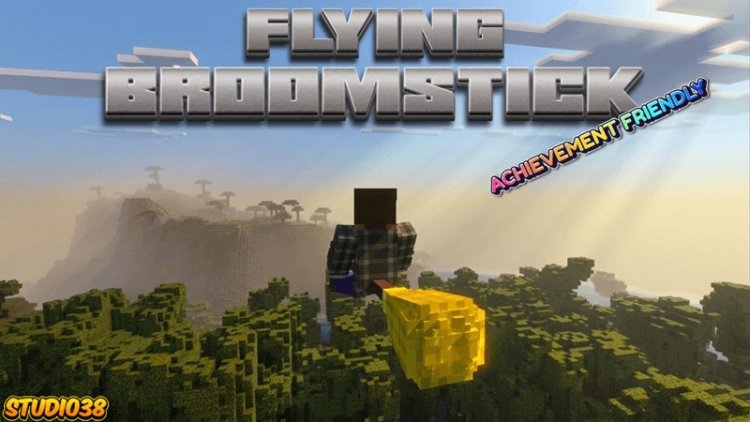
Created by Studio 38
Flying Broomstick: The Best Aerial Traversal Addon for Minecraft Bedrock
Tired of walking across your massive Minecraft worlds? The Flying Broomstick addon by Studio 38 introduces rideable magical broomsticks that let you soar through the skies, combining whimsical fantasy elements with practical high-altitude exploration. Whether you're scouting terrain, hunting biomes, or just enjoying the freedom of flight, this addon transforms how you navigate Bedrock Edition.

What Is a Flying Broomstick in Minecraft?
The Flying Broomstick is a craftable rideable entity that allows players to take to the air without relying on creative mode flight or elytra. Once you mount a broomstick, you gain full control over your movement and can climb to impressive altitudes while maintaining smooth flight mechanics. It's one of the most intuitive ways to experience aerial traversal in Minecraft Bedrock, sitting somewhere between the limitations of normal survival mode and the freedom of creative flight.
This addon fills a specific niche: players who want fast, magical traversal without breaking immersion or resorting to creative mode cheats. Unlike flying cheat codes that remove the challenge entirely, the broomstick feels like an earned tool you can craft and carry with you.

Flying Broomstick Minecraft: Two Speed Variants for Different Playstyles
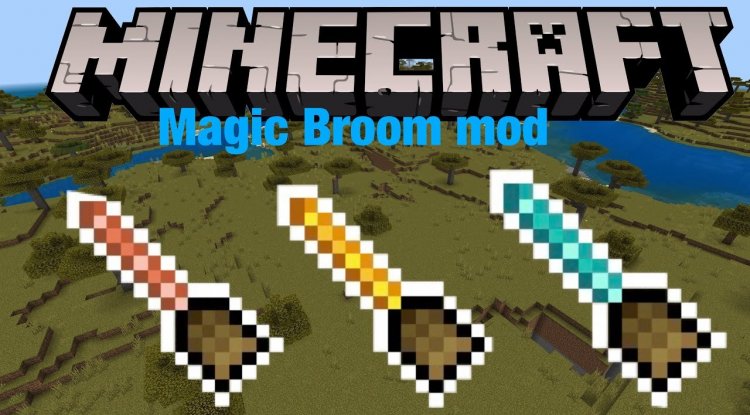
Studio 38 designed this addon with flexibility in mind. You get access to two distinct broomstick variants, each with different performance characteristics:
- Basic Broomstick — Offers standard flight speed for reliable, steady exploration. Perfect for newer players or those who prefer a measured pace.
- Gold Trim Broomstick — A faster variant that cuts your travel time significantly. Ideal for experienced players who've already mapped out their worlds and want maximum efficiency.
The beauty here is that you're not locked into one choice. You can craft both variants and switch between them depending on your mood or the task at hand. Need to carefully survey a new region? Grab the basic broomstick. Ready to zoom across the map to reach your base? The gold trim version has you covered.

Customization: Swap Broomstick Types Through Configuration
One of the standout features of this addon is how easily you can modify the broomstick behavior. You can change broomstick variants by modifying log type configuration, giving you granular control over which materials generate which flight speeds. This means if you prefer the faster variant or want to adjust performance based on your server's needs, the addon supports that flexibility without requiring complicated file edits or external tools.
For addon creators or server administrators, this level of customization is a breath of fresh air. You're not forced into a one-size-fits-all experience; instead, the addon bends to your world's unique needs.
Seamless Integration: Achievements Still Work
A common concern with gameplay-altering addons is whether they'll disable your achievement progress. The Flying Broomstick addon maintains full compatibility with Minecraft's achievement system, so you can earn every badge and milestone without worry. This is crucial for players who care about progression and recognition within the game.
Additionally, this addon doesn't mess with core player files, meaning it plays nicely with other addons and doesn't create save file conflicts. You can stack this with behavior packs, resource packs, and other modifications without tension.
Installation and Technical Details
The Flying Broomstick addon is refreshingly straightforward to install. Since it's distributed as a .mcpack file, you simply download it and open it in Minecraft Bedrock Edition. The game will automatically prompt you to import the addon into your world. No experimental gameplay toggles are required, which means you can activate it immediately without enabling experimental features that might change other game mechanics.
One technical note: this addon doesn't modify the player.json file, which keeps your character data clean and reduces potential conflicts with other addons. It's designed with compatibility as a core principle.
How to Install the Flying Broomstick Addon
- Download the Flying Broomstick .mcpack file from the source
- Open the file on your device (mobile, console, or Windows 10/11)
- Minecraft will automatically detect and import the addon
- Create a new world or edit an existing one
- Add the Flying Broomstick addon to your world's behavior pack stack
- Save and load your world — you're ready to fly!
The installation typically takes under a minute, and you'll find the broomsticks available in your creative inventory or through standard crafting recipes once activated.
Why This Addon Ranks Among the Best MCPE Addons for 2026
When evaluating what are the best Minecraft addons available right now, the Flying Broomstick checks multiple boxes. It doesn't overload you with unnecessary features; instead, it solves a specific problem—getting around your world faster—in a way that feels magical and intentional rather than cheesy. The dual-variant system respects different playstyles, the customization options appeal to server admins and creators, and the achievement compatibility means no sacrifices to your progression.
For anyone compiling a list of best mcpe addons 2026, this one deserves consideration, especially if you prioritize exploration and quality-of-life improvements over combat or building mechanics.
Community and Creator Support
Studio 38, the creator behind this addon, maintains an active Discord community server where you can report bugs, suggest features, or connect with other players. This kind of creator engagement is invaluable when you encounter issues or want to discuss the addon's future direction.
The fact that Studio 38 invested in enhancing the addon's thumbnail image using AI processing shows attention to detail—a good sign that the addon itself received similar care during development.
Flying Broomstick Minecraft: FAQ
Can you make an airplane in Minecraft using this addon?
No, this addon specifically provides broomsticks for individual flight. If you want airplane-style vehicles, you'd need a separate addon focused on that mechanic. However, the broomstick offers similar freedom of movement without requiring a pilot seat or passenger system.
Is the Flying Broomstick addon like a flying cheat code in Minecraft?
It provides similar speed benefits to creative mode flight, but it's not a straight cheat code since you still need to craft the broomstick as an item. You're earning the ability rather than typing a command, which preserves a sense of progression even in survival mode.
Do I need experimental gameplay enabled to use this addon?
No, experimental gameplay toggles are not required. The addon works immediately upon installation without enabling any beta features, making it safe for vanilla-focused players.
Can I customize the flight speed of the broomsticks?
Yes, by modifying the log type configuration in the addon settings, you can adjust which broomstick variants have which speed levels. This gives you full control over performance tuning.
What's Your Reaction?














![Patrix Resource Pack For 1.19 [32x→256x]](https://minecraftmodded.com/uploads/images/202210/image_750x415_6343b3ab59eff.jpg)


