Reverse Craft Table Mod: Uncraft Items in MCPE 2026
Discover the Reverse Craft Table addon by A-Perion. Uncrafting addon for Minecraft Bedrock that lets you reverse crafting recipes and recover materials from items.
Created by A-Perion
Reverse Craft Table: The Ultimate Uncrafting Addon for Minecraft Bedrock
Ever crafted something in Minecraft Bedrock Edition only to immediately regret it? The Reverse Craft Table addon by A-Perion solves one of vanilla Minecraft's most frustrating limitations: the inability to reverse your crafting decisions. This ingenious mod introduces a specialized workbench that lets you deconstruct completed items back into their original materials, recovering resources you thought were permanently lost.
Photos by A-Perion
What Makes the Reverse Craft Table One of the Best MCPE Addons?
When we talk about best minecraft addons for Bedrock Edition, functionality and ease-of-use are key deciding factors. The Reverse Craft Table checks both boxes. Unlike theoretical solutions, this addon provides a tangible, intuitive way to "uncrafted" items without exploiting game mechanics or requiring tedious workarounds.
The core appeal is beautifully simple: build the workbench, place your completed item inside, and recover the base materials that went into making it. Whether you accidentally crafted the wrong tool enchantment vessel, miscalculated your wood requirements, or just want more flexibility in your early-game resource management, this addon transforms how you approach crafting in survival mode.
What sets it apart from other best mcpe addons 2026 contenders is its thematic design. Everything revolves around amethyst—a material that fits naturally into modern Minecraft while making the feature feel intentional rather than overpowered.
Can You Reverse Craft in Minecraft? How This Addon Works
The short answer is: not in vanilla Minecraft, but yes with this addon. The Reverse Craft Table answers the age-old question "can you reverse craft in minecraft" with a resounding yes.
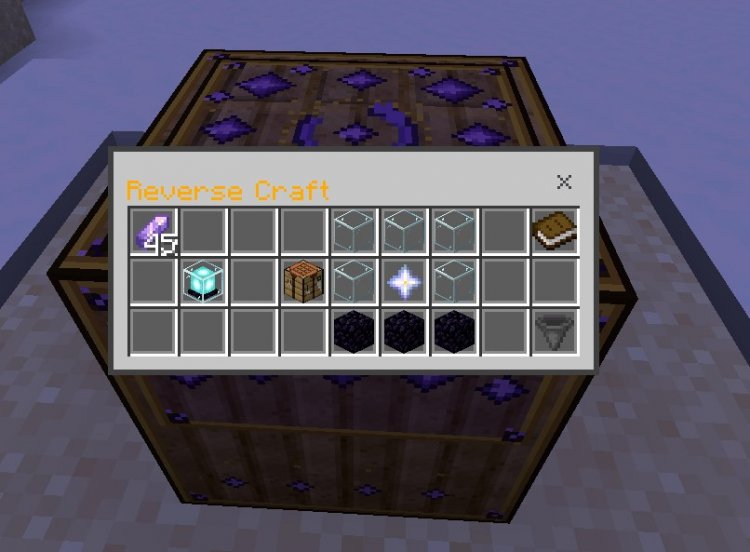
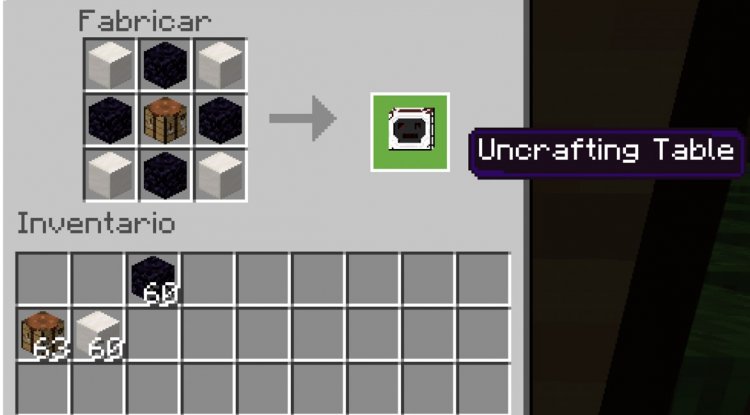
Here's the practical process: You'll craft a special Reverse Craft Table by surrounding a standard crafting table with eight amethyst shards in a square pattern. Once created, this workbench looks distinctly different—featuring beautiful amethyst-themed textures that make it instantly recognizable.
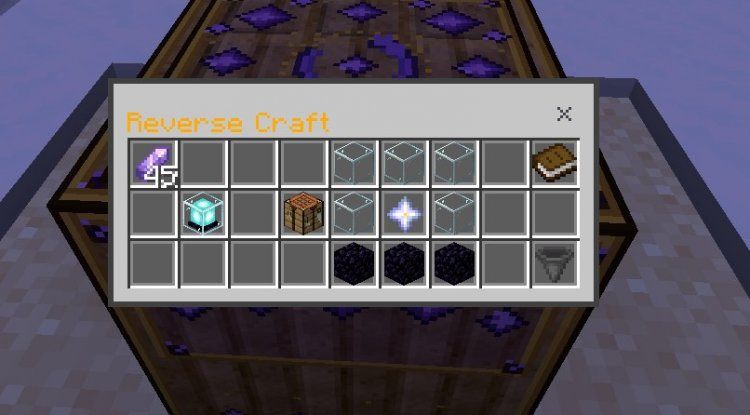
Drop any crafted item into the interface, and the addon automatically displays what materials you'll recover in a clean 3×3 grid layout. The preview shows exactly what you're getting back before committing to the reversal. If you're satisfied, you can proceed with the uncrafting process.
The genius detail: the addon automatically collects previous craft outputs while you're previewing new items. This means your inventory management is streamlined—materials appear directly in your inventory as you work, rather than cluttering the UI.
Key Features & Mechanics of the Reverse Crafting Table Addon
- Reverses both shaped and shapeless vanilla crafting recipes with accuracy
- Displays material requirements in a clear 3×3 grid before finalizing any reversal
- Optional cost system using amethyst shards as currency (or free operation if cheats are enabled)
- Automatically collects previous craft outputs during previews
- Custom amethyst-themed user interface and block textures
- Cannot reverse damaged or enchanted items (prevents exploits)
- Multi-output recipes require matching quantities (e.g., 4 sticks needed to reverse a recipe that yields 4 sticks)
Reverse Crafting Table Minecraft: Important Limitations to Know
Before installing, understand what this reverse crafting table mod can and cannot do. The addon is intentionally designed with safeguards to maintain game balance.
Enchanted items cannot be reversed. This prevents players from farming enchanted tools and then breaking them down infinitely. Similarly, damaged items are locked out—you can't uncrafted a half-broken sword into pristine materials. These restrictions keep survival mode challenging and prevent potential exploits.
For multi-output recipes, quantities must match exactly. If a recipe produces four sticks, you need four sticks to reverse it. This prevents recipe confusion and ensures the system works logically.
The cost system adds another layer of balance. Using amethyst shards as a "currency" for reversals means uncrafting isn't free—you're investing resources to recover resources. However, if you enable cheats in your world, reversals become free, giving creative-minded players the option to disable the cost system entirely.
Is the Reverse Craft Table Worth Adding to Your World?
Whether this addon belongs in your survival world depends on your playstyle. For players who value exploration and resource gathering over careful planning, the Reverse Craft Table transforms anxiety into opportunity. Made a premature crafting decision? Recover your materials and try again.
For competitive survival players or those running hardcore worlds, the amethyst shard cost system ensures you're not getting a "free undo button." You're trading resources for convenience—a fair exchange that doesn't trivialize progression.
Creative and experimental players will love the flexibility. Want to try three different wood types for your house before committing? Reverse whatever doesn't work and reclaim your materials instantly.
The addon is particularly valuable in the early game, where resource scarcity is real. A mistimed furnace or accidental over-crafting can set your progress back significantly. With the Reverse Craft Table, these mistakes become learning opportunities rather than setbacks.
How to Install the Reverse Crafting Table Addon
Installing this addon requires a few setup steps since it uses behavior packs and resource packs.
Step 1: Enable Beta APIs
Open Minecraft Bedrock Edition and navigate to Settings → General. Scroll down and enable "Beta APIs" or "Experimental Features" (the exact name varies by version). This allows addons to access advanced functionality.
Step 2: Install the Addon Files
Download the addon package, which contains both a behavior pack and resource pack. On most devices, these extract to your Minecraft folder automatically. On mobile, you may need to use a file manager app to place files in the correct directories.
Step 3: Activate in Your World
Create a new world or open an existing one. Go to Settings → Resource Packs and activate the Reverse Craft Table resource pack. Then go to Settings → Behavior Packs and activate the behavior pack. Some addons require you to activate both; confirm by checking your active packs list.
Step 4: Test the Feature
Once activated, craft a Reverse Craft Table using a crafting table surrounded by 8 amethyst shards. Place it in your world and test with a simple crafted item.
Frequently Asked Questions About the Reverse Craft Table
Does the Reverse Craft Table work with modded items or only vanilla recipes?
The addon primarily handles vanilla crafting recipes. Compatibility with other addons depends on whether those addons properly register their recipes through Minecraft's standard crafting system. Testing in your specific world setup is recommended.
Can you reverse craft enchanted books or other enchanted items?
No, enchanted items cannot be reversed. This is an intentional design choice to prevent exploitation. Only unenchanted, undamaged crafted items can be uncrafted.
What happens if I enable cheats—does uncrafting become completely free?
Yes, enabling cheats disables the amethyst shard cost system entirely. This gives you the flexibility to decide whether you want the economy-based balance or free uncrafting for relaxed gameplay.
Can the Reverse Craft Table reverse smelting recipes or only crafting recipes?
The Reverse Craft Table handles crafting recipes only. Smelting, cooking, and other furnace-based recipes are not included in this addon's functionality.
What's Your Reaction?












![Patrix Resource Pack For 1.19 [32x→256x]](https://minecraftmodded.com/uploads/images/202210/image_750x415_6343b3ab59eff.jpg)


