Best Shaders for Minecraft PE 2026: Lumina Prism Visuals
Lumina Prism Visuals is a shader pack for Minecraft PE that boosts color saturation and lighting. Perfect for realistic MCPE shaders on Bedrock.
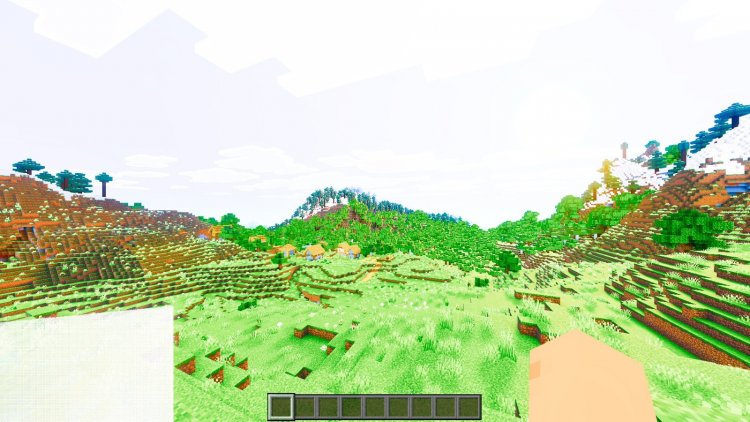
Created by Blocky Studio
Lumina Prism Visuals is a shader modification for Minecraft Bedrock that rewrites how light and color appear in your world. If you've been looking for the best shaders for Minecraft PE that don't require a high-end device, this pack takes a different approach than most: instead of chasing photorealism, it transforms the game's color palette and lighting into something warmer and more saturated.
Created by Blocky Studio, this shader pack focuses on tweaking the fundamentals of how Minecraft renders its blocks and sky. The goal isn't to add new geometry or ray-traced reflections, but to make the existing world feel more alive through smarter color grading and lighting adjustments.
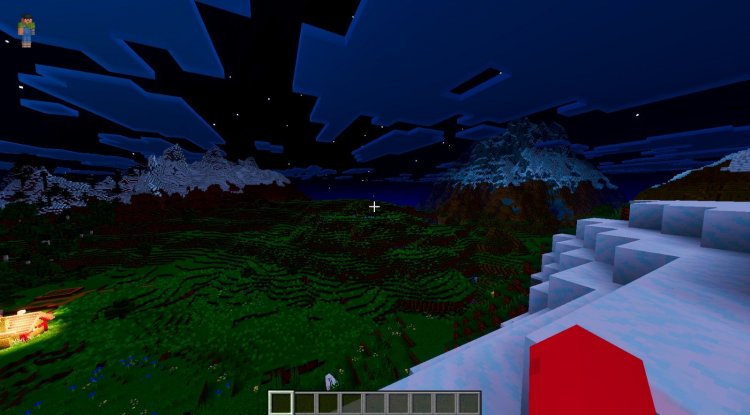
Photos by Blocky Studio
What makes Lumina Prism Visuals different from other shader packs
Most shader packs try to chase photorealism. They add water reflections, complex shadows, and ambient occlusion until your phone or tablet is running at 20 FPS. Lumina Prism Visuals takes the opposite path. It respects that you're playing on MCPE, not a gaming PC.
The core philosophy here is color and mood. Blocky Studio's design prioritizes saturation and warmth without making the game unrecognizable. Your cobblestone still looks like cobblestone, but it catches light in a richer way. Sunsets don't just happen; they flood your world in color.
This matters if you want the best shader packs for Minecraft 2026 that actually run smoothly on Bedrock. Performance-heavy shaders are common, but a pack that changes how you perceive the game without tanking your frame rate is rarer.
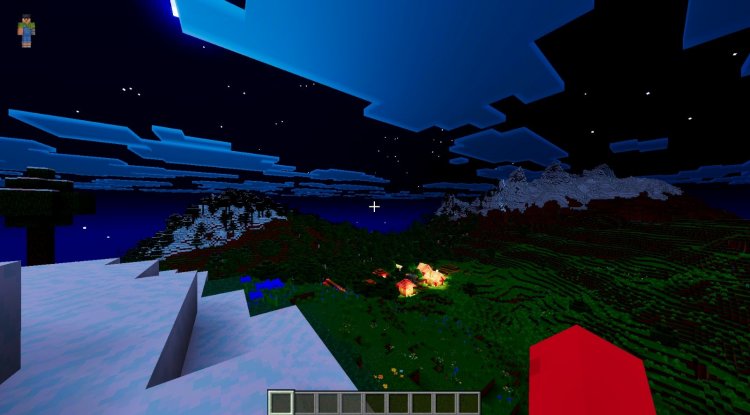
Core features of Lumina Prism Visuals
- Increased color saturation across all blocks and mobs, making greens pop and reds stand out
- Enhanced lighting effects that respond to both sun and artificial light sources
- Warmer color temperature, shifting the overall palette toward golden and amber tones
- Softer visual transitions between lit and shadowed areas, reducing harsh contrasts
- Improved atmospheric presentation for skies, fog, and ambient light
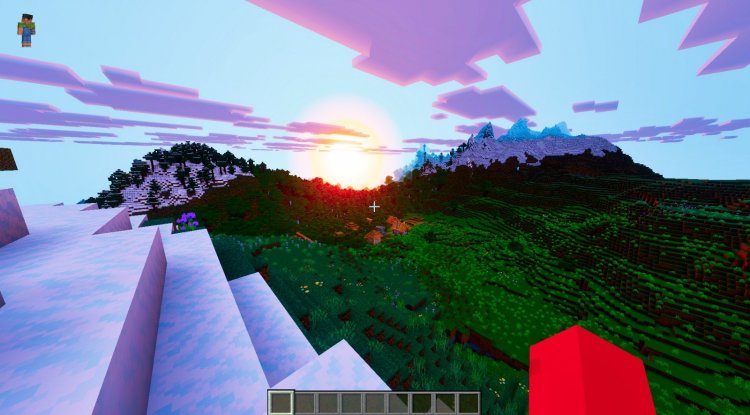
Visual changes you'll actually see in-game
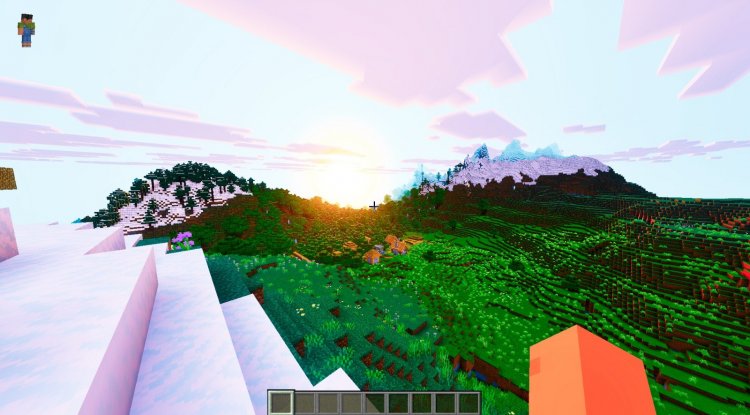
Install this and load a world. Within seconds, the difference is obvious. Grass blocks appear more verdant. Oak logs show deeper browns. When sunset hits, the sky doesn't just turn orange; it bleeds warmth across every surface.
Water is one area where the changes feel most pronounced. Instead of flat blue, it picks up the color of the sky and reflects it with more depth. Torchlight doesn't just create a small bright circle anymore; it creates a softer glow that spreads into nearby blocks.
The softer transitions mean that transitions between light and shadow feel less jarring. You won't see the harsh shadows typical of vanilla Minecraft. Instead, areas gradually shift from bright to dim, which reads as more natural to the human eye.
If you're building with lots of different block types, the increased saturation actually helps them blend or contrast intentionally. A roof of red terracotta against green grass feels more distinct. A structure made from stone variants shows better depth.
Performance on different devices
Lumina Prism Visuals is designed to run on phones and tablets without constant lag. That doesn't mean it's free; shaders always cost FPS. Expect a 10 to 20 frame drop depending on your device, resolution, and render distance.
On a mid-range phone from 2024 or newer, you should see stable 30+ FPS in most situations. Older devices might dip closer to 20 FPS in complex areas like jungles or heavily built-up bases. If you're on a high-end tablet, you could maintain 50+ FPS.
The pack scales reasonably well. If performance becomes an issue, you can lower your render distance or disable certain effects. Many shader packs for MCPE don't offer that kind of control, so this is worth checking.
Is Lumina Prism Visuals the best shader pack for your playstyle?
This pack works best if you enjoy building and exploring. The color boost makes creative mode feel rewarding; your builds look more intentional under these lighting conditions. Survival players get an atmospheric upgrade without feeling like they're playing a different game.
It's less ideal if you want the most realistic shaders for Minecraft PE on the market. If photorealism is your goal, you'd want packs that go further with water physics, shadow mapping, and normal maps. Lumina Prism Visuals doesn't pursue that direction.
If you're tired of vanilla's flat, washed-out colors but don't want to sacrifice playability, this lands in a sweet spot. It's one of the better shader packs for Minecraft 2026 if you value mood and performance equally.
How to install Lumina Prism Visuals
Installation on Bedrock Edition is straightforward. Download the .mcpack file and open it on your device. Minecraft will import it automatically and add it to your behavior packs list. From there, activate the pack in your world settings before loading a world.
Make sure you're running the latest version of Minecraft Bedrock. Older versions sometimes have compatibility issues with newer shader packs. If the pack doesn't appear in your list after downloading, try restarting the game.
You can apply the shader to existing worlds or new ones. If you apply it to old worlds, the lighting may look different at first as the game recalculates the lighting data. Give it a moment to settle before panicking.
Frequently asked questions
Can you get shaders on Minecraft PE?
Yes. Minecraft Bedrock Edition, which includes Pocket Edition on phones and tablets, supports shader packs through the standard .mcpack file format. You download and install them like any other behavior or resource pack.
Will Lumina Prism Visuals work on older devices?
It should, but with caveats. Devices from 2020 or earlier may experience noticeable frame drops, especially in densely built areas. If that's your hardware, test it on a short creative world before committing to a long survival run.
What's the difference between the best MCPE shaders and PC shader packs?
Mobile shaders are far more limited. They can't use advanced ray tracing or complex shadow algorithms. Instead, they work with simpler color grading, lighting adjustments, and texture tweaks. Lumina Prism Visuals is a mobile-first shader, so it follows those constraints.
Does this pack change gameplay or just visuals?
Only visuals. Lumina Prism Visuals adjusts colors and lighting but doesn't modify block properties, mob behavior, or game mechanics. Survival difficulty stays the same.
What's Your Reaction?













![Patrix Resource Pack For 1.19 [32x→256x]](https://minecraftmodded.com/uploads/images/202210/image_750x415_6343b3ab59eff.jpg)


