Summerset Visuals Texture Pack - Late Summer Aesthetic for Bedrock
Summerset Visuals brings late summer aesthetics to Minecraft Bedrock with PBR maps, colored lighting, and realistic celestial textures. Enhanced visuals for a vibrant experience.
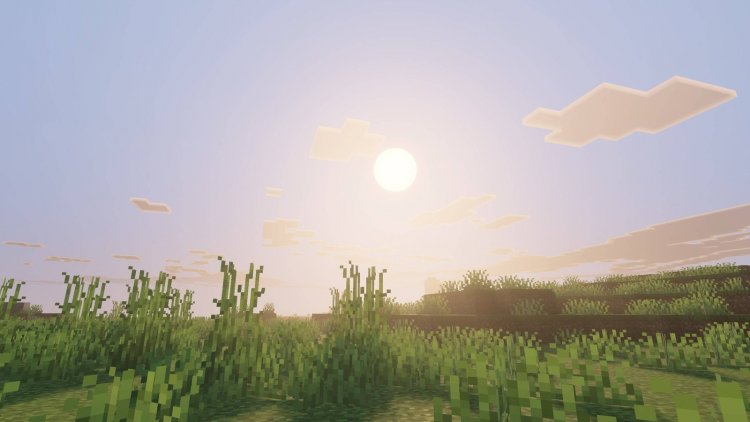
Created by Duckkit
Summerset Visuals is a texture pack for Minecraft Bedrock that transforms your world with late summer aesthetics, featuring physically-based rendering (PBR) maps and enhanced colored lighting effects. Created by Duckkit and designed to work with Vibrant Visuals, this pack takes the visual experience beyond standard textures by introducing atmospheric elements that make summer exploration feel more immersive and visually striking.
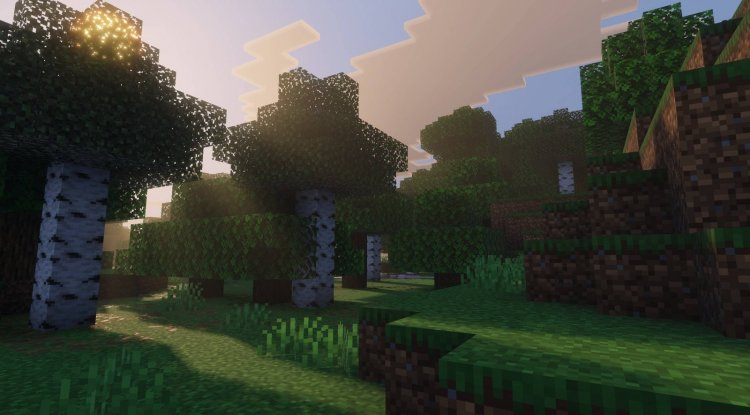
Photos by Duckkit
What Makes Summerset Visuals Stand Out
If you've been playing Minecraft long enough, you know that the difference between a standard texture pack and a truly memorable one often comes down to attention to detail. Summerset Visuals isn't just a reskin of familiar blocks—it's a carefully crafted visual enhancement that prioritizes environmental storytelling through summer vibes.
The pack leans heavily on the late summer mood: think golden hour lighting, warm reflections, and that specific quality of light you get when the season is transitioning. Rather than going for hyper-realistic or cartoon extremes, Summerset sits in that sweet spot where Minecraft's blocky aesthetic meets genuine atmospheric improvement. Whether you're exploring caves, mining ores, or just taking screenshots, the visual enhancements feel natural rather than jarring.
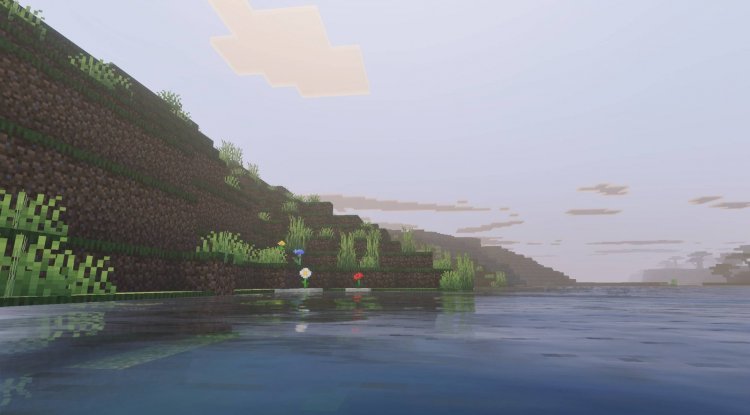
PBR Rendering for Reflective Surfaces and Ore Blocks
One of the standout technical features of Summerset Visuals is its implementation of PBR (physically-based rendering) maps. For those unfamiliar, PBR is a rendering approach that simulates how light actually interacts with different material surfaces—metals reflect differently than stone, for example, and this technique makes those differences visible and believable.
In Summerset Visuals, PBR maps have been applied specifically to reflective surfaces and ore blocks. This means when you're mining that diamond ore or stumbling upon copper deposits, they'll catch light in realistic ways. The reflective properties vary based on material type, so iron ore catches light differently than gold, creating visual depth that standard textures simply can't match. For ore hunters and cave explorers, this is genuinely cool—you'll spot valuable resources more intuitively because they behave visually like their real-world material counterparts.
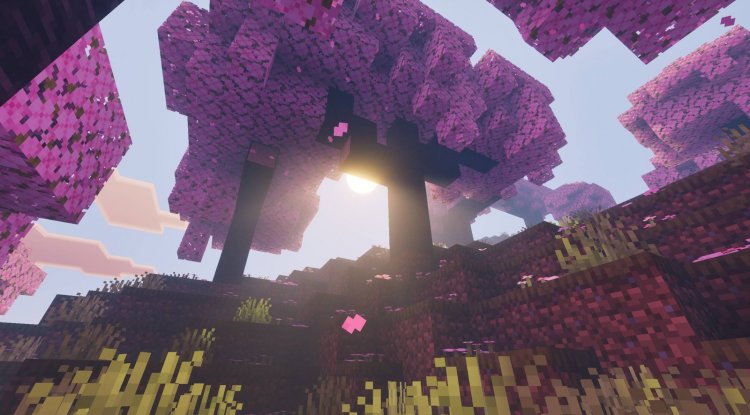
Colored Lighting That Actually Illuminates Your World
Minecraft's default lighting is functional but relatively flat. Summerset Visuals addresses this with colored lighting effects applied to most light-emitting sources. This means torches, lanterns, glowstone, and other light sources now cast light with actual color properties rather than generic white illumination.
The practical benefit? Your base or mining operation suddenly feels more atmospheric. A torch-lit corridor gets warm, golden tones. Lava emits an appropriate orange-red glow that actually affects nearby blocks. Even subtle light sources like soul lanterns emit their characteristic blue hue more convincingly. If you use shaders alongside Vibrant Visuals, this effect becomes even more pronounced, creating dramatic lighting scenarios that feel cinematic.
Enhanced Sky and Cloud Textures
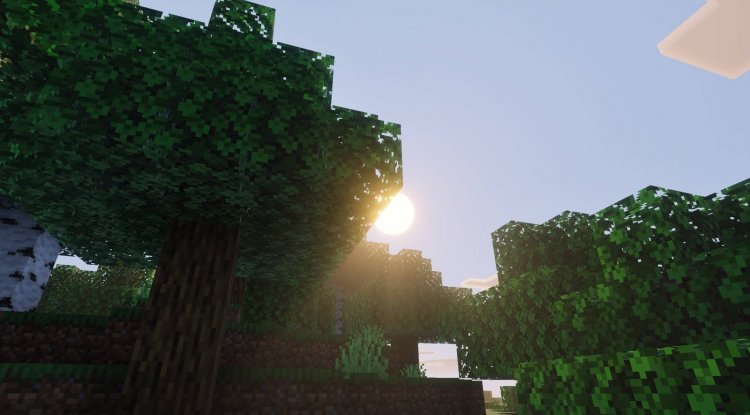
The sky is something we stare at constantly in Minecraft, yet it's often overlooked when evaluating texture packs. Summerset Visuals upgrades both the sun and moon with realistic textures that feel more detailed and dimensionally accurate than vanilla versions. The celestial bodies no longer feel like flat colored discs—they have subtle detail and gradation that suggests actual spherical form.
The custom cloud texture pattern is equally impressive. Rather than the default puffy clouds, Summerset introduces cloud patterns that feel more organic and visually varied. Clouds now catch the warm late-summer light differently, and their texture prevents the monotonous repetition you often notice in vanilla play. If you spend time building at high altitudes or taking landscape screenshots, you'll appreciate how much these sky changes elevate the overall atmosphere.
The Vibrant Visuals Requirement: What You Need to Know
Before downloading Summerset Visuals, it's important to understand that this pack is designed to work in conjunction with Vibrant Visuals. It's not a standalone texture pack. Think of it as an enhancement layer that sits on top of Vibrant Visuals' foundation. This means you'll need Vibrant Visuals installed and enabled before Summerset will display its features correctly.
The benefit of this approach is that Duckkit could focus on optimizing specific visual elements rather than rebuilding the entire texture set from scratch. The drawback is the additional file management—you're stacking two packs rather than installing one. For players who prefer streamlined setups, this might feel like extra work. However, if you're already using Vibrant Visuals, adding Summerset is straightforward and worth the minimal effort.
Who Should Try Summerset Visuals?
This pack is ideal for players who:
- Already use or enjoy Vibrant Visuals and want to enhance it further
- Care about atmospheric and aesthetic improvements alongside gameplay
- Play with shaders or advanced rendering options and want textures that complement them
- Enjoy building and want their structures to look their absolute best in screenshots and videos
- Appreciate summer aesthetics and want that season's mood year-round in their world
- Are curious about PBR rendering and want to see it in action within Bedrock
If you primarily play for vanilla Survival or prefer minimal visual changes, Summerset might feel like overkill. But for creative players, builders, and visual enthusiasts, it's absolutely worth trying.
How to Install Summerset Visuals
Installing Summerset Visuals on Bedrock Edition is straightforward. First, ensure you have Vibrant Visuals installed and activated in your world. Download the Summerset Visuals .mcpack file and open it—your Bedrock launcher will automatically recognize it and prompt you to import it into your resource packs folder. Once imported, navigate to your world settings, find Summerset Visuals in your available resource packs, and activate it by moving it to the active list. Make sure it loads after Vibrant Visuals in the pack order for optimal compatibility. Restart your world, and the enhanced textures should take effect immediately.
FAQ: Common Questions About Summerset Visuals
Do I absolutely need Vibrant Visuals installed for this to work?
Yes. Summerset Visuals is built as an enhancement for Vibrant Visuals specifically. Installing it without Vibrant Visuals will result in visual issues or the pack not displaying correctly. Think of it as an add-on rather than a standalone pack.
Will Summerset Visuals work with shaders?
Yes, absolutely. In fact, the colored lighting effects and PBR rendering become even more impactful when paired with quality shader packs. If you use shaders like ESBE 2G or similar options, Summerset will complement them beautifully rather than conflict.
Can I use Summerset Visuals on servers or Realms?
Texture packs are client-side on Bedrock Edition, meaning they only affect what you see personally. You can use Summerset Visuals on any Realm or server you play on without affecting other players. However, confirm with your server administrator that custom resource packs are permitted.
Is there performance impact from the PBR maps and colored lighting?
Summerset Visuals is optimized for Bedrock and shouldn't cause significant performance drops on most devices. However, on lower-end hardware or when combined with demanding shaders, you might notice minor performance changes. Test it in-game on your specific device to see if it meets your performance expectations.
What's Your Reaction?













![Patrix Resource Pack For 1.19 [32x→256x]](https://minecraftmodded.com/uploads/images/202210/image_750x415_6343b3ab59eff.jpg)


