Magic Stick Addon for Minecraft Bedrock: Cheat Menu Guide
Magic Stick is a Bedrock addon that transforms a regular stick into a powerful cheat menu tool. Right-click to access Creative Mode, effects, and more.
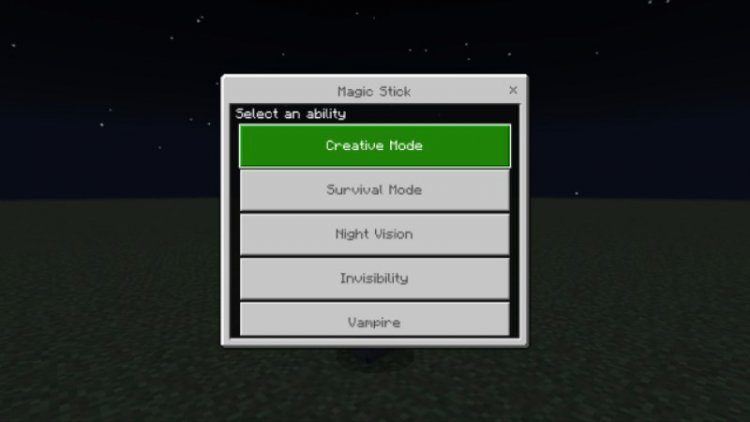
Created by soo hyun
Magic Stick is a Bedrock Edition addon that turns a humble wooden stick into a versatile cheat menu tool. Created by soo hyun, this addon lets you right-click with a stick to access a menu of powerful functions—perfect for creative players, content creators, and anyone who wants faster access to common cheats without typing commands.
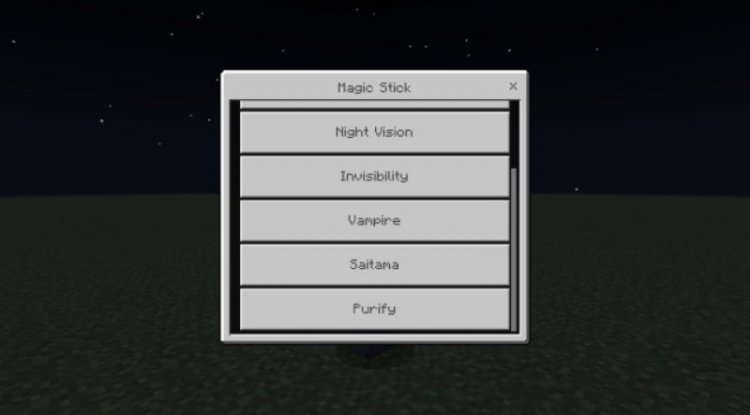
Photos by soo hyun
What Makes Magic Stick Different From Other Minecraft Cheat Tools
If you're familiar with traditional Minecraft commands, you know that toggling Creative Mode, applying effects, or managing game modes typically requires typing commands or hunting through menus. Magic Stick flips that workflow on its head by condensing multiple cheat functions into a single, intuitive stick-based interface.
Unlike a magic wand minecraft plugin that might require server setup or complex configuration, this magic stick minecraft addon works immediately upon installation in Bedrock Edition. The genius of the design is its simplicity: no keybinds to memorize, no lengthy commands to remember. Just grab a stick, right-click, and choose what you need from the menu. It's the kind of streamlined approach that makes gameplay interruptions feel less jarring, whether you're building in Creative Mode, testing survival scenarios, or recording gameplay footage.
Key Features: Everything You Can Do With the Magic Stick
- Instant Creative Mode Access — Switch to Creative Mode without leaving your world or typing a command
- Survival Mode Toggle — Quickly revert to Survival Mode for gameplay testing
- Night Vision Effect — Activate Night Vision on demand for spelunking or cave exploration
- Invisibility Effect — Grant yourself invisibility with a single menu selection
- Vampire Mode Functionality — A unique twist that adds RPG-style mechanics to your gameplay
- Right-Click Menu Interface — All options accessed through a clean, organized menu system
- No Command Knowledge Required — Gameplay-focused interface means you don't need to understand command syntax
Magic Wand Minecraft: How the Stick-Based Menu Works
The magic stick minecraft bedrock addon operates on a simple principle: equip a stick, hold it, and right-click. A menu appears with your available options. From there, select whatever cheat function you need—switch game modes, apply effects, or enable special abilities like Vampire Mode.
This approach feels more intuitive than hunting through nested menus in Bedrock settings, and it's significantly faster than typing magic stick minecraft commands or magic wand minecraft command alternatives. For content creators recording gameplay, this means smoother transitions and fewer awkward pauses while you fiddle with settings. For builders in Creative Mode, it streamlines the workflow so you can focus on design rather than mechanics.
Who Should Install This Magic Wand Addon for MCPE
This magic wand addon mcpe is especially valuable for:
Creative Builders — If you're switching between Creative and Survival modes frequently, having instant access through a stick beats navigating menus repeatedly.
Content Creators & YouTubers — Streamline your footage by reducing setup time. The magic wand minecraft build demonstrations become faster and cleaner when you're not pausing to type commands.
Gameplay Testers — If you're testing survival mechanics, combat, or exploring caves, quick access to Night Vision and Invisibility without command menus keeps you immersed.
Casual Modders — Even if you're new to Bedrock addons, the magic stick minecraft addon is straightforward enough to install and use immediately without extensive configuration.
Vanilla Players Exploring Addons — This is an excellent entry point if you're curious about what addons can do. It's simple, immediately useful, and doesn't dramatically overhaul gameplay mechanics.
Magic Stick vs. Traditional Minecraft Commands: Speed & Convenience
Let's be honest—typing out a command like /gamemode creative works fine, but when you're doing it dozens of times during a session, it becomes tedious. A magic wand minecraft command requires you to remember syntax and open the chat interface.
The magic stick minecraft mod (in addon form) eliminates that friction. There's no learning curve for commands, no typos to debug, and no chat interface cluttering your screen. It's the difference between having a dedicated tool versus using a general-purpose system.
The Vampire Mode addition is a nice touch that sets this apart from purely utilitarian cheat tools. It suggests that soo hyun built this addon with actual gameplay variety in mind, not just as a convenience wrapper around basic commands.
How to Install the Magic Stick Addon
Installing a magic wand minecraft addon in Bedrock Edition is straightforward:
- Download the .mcpack file (usually provided as a single file from the addon source)
- On Windows 10/11 or mobile, double-click the .mcpack file, which should automatically open Minecraft and prompt you to import it
- Confirm the import when Minecraft asks you to add the addon to your world or as a global addon
- Launch or create a world and enable the addon in the world settings under "Add-ons"
- Once active, spawn or find a wooden stick and begin right-clicking to access the menu
If the .mcpack doesn't auto-import, you can manually place it in your Bedrock resource packs or behavior packs folder (depending on how the addon is structured). The process is identical to installing any other magic stick minecraft bedrock addon or plugin.
Frequently Asked Questions About the Magic Stick Addon
Does the Magic Stick addon work in multiplayer worlds?
Yes, but since it's an addon that modifies item behavior, all players would need to have it installed. In realm worlds, the host can enable the addon, though server-side behavior varies depending on your Bedrock setup.
Can I use a magic wand minecraft instead of a stick?
No, this addon specifically requires a wooden stick to function. If you want a different visual appearance, you could create a custom texture pack to make the stick look like a wand, but the item itself must be a stick.
Will this magic stick minecraft mod break my world or cause lag?
No, it's a lightweight addon that simply adds menu functionality to an existing item. It won't affect world generation, mob behavior, or overall performance. Feel free to enable it in existing worlds without worry.
Is there a difference between this addon and other cheat menu tools?
The main difference is the stick-based interface and the inclusion of Vampire Mode. Most magic wand minecraft plugins or magic wand minecraft mod alternatives focus on command automation, but this one prioritizes a streamlined, gameplay-integrated approach.
Final Thoughts: A Thoughtful Addon for Convenience-Focused Players
The Magic Stick addon by soo hyun is exactly what it claims to be—a convenient, menu-driven alternative to typing cheat commands. It's not flashy or game-changing in the way some addons are, but that's precisely why it works. Its utility is immediate and its execution is clean.
Whether you call it a magic stick, magic wand, or cheat tool, the addon fills a genuine gap in Bedrock gameplay for anyone tired of menu-diving or command syntax. If you're building, creating content, or just want faster access to common cheats, this one belongs in your addon collection.
What's Your Reaction?












![Patrix Resource Pack For 1.19 [32x→256x]](https://minecraftmodded.com/uploads/images/202210/image_750x415_6343b3ab59eff.jpg)


