Lag Shield Addon: Stop Lag in Minecraft Bedrock
Lag Shield is a Minecraft Bedrock addon that automatically removes lag sources by monitoring entities and performance metrics. Keep your world running smoothly.
Created by Relyz
Lag Shield: The Addon That Actually Stops Lag Spikes in Minecraft Bedrock
Lag Shield is a Minecraft Bedrock addon created by Relyz that diagnoses and automatically cleans up lag sources by monitoring real-time performance metrics and removing accumulated entities. Instead of letting your world slowly grind to a halt as mobs pile up and items scatter across the ground, this addon works silently in the background to keep your tick rate stable and your gameplay smooth.
If you've ever watched your frame rate tank because someone left an AFK farm running, or spent an hour searching for why your world suddenly became unplayable, Lag Shield addresses exactly that problem. It's designed specifically for Bedrock Edition players who run modded worlds or survival servers where entity buildup is inevitable.
Photos by Relyz
What Is Lag Shield and What Does It Do?
At its core, Lag Shield is a performance monitoring and cleanup system wrapped into one lightweight addon. It watches your world's tick rate (TPS) in real time, displays exactly how many entities are loaded, and automatically removes the most common causes of lag spikes—dropped items, experience orbs, and stuck projectiles.
The addon doesn't just blindly delete everything. It's smart enough to protect valuable items like netherite gear, diamonds, enchanted books, named items, elytra, totems, tridents, and shulker boxes from the cleanup cycle. This means you can run aggressive lag prevention without losing your important loot.
Think of it as a performance health monitor that takes action before your world becomes unplayable, rather than waiting for you to notice frame drops and manually hunt down the problem.

Key Features of Lag Shield: More Than Just Entity Removal
What separates Lag Shield from simpler cleanup addons is the level of detail it provides and the customization it offers. Here's what makes it one of the best MCPE addons for performance management:
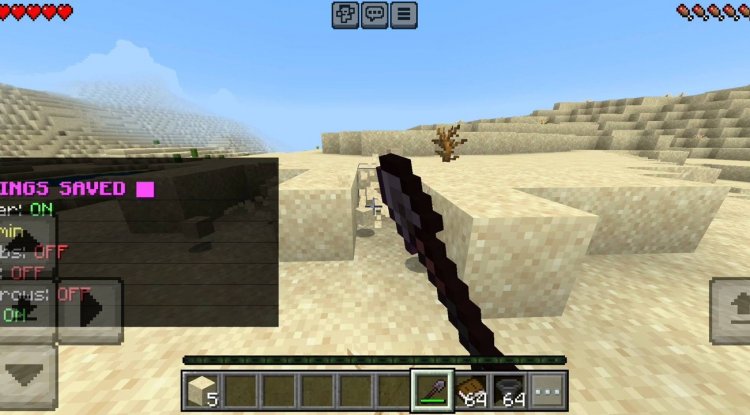
- Real-time TPS display with performance grades — See exactly what your world's tick rate is and get a visual assessment of whether your performance is excellent, good, fair, or poor
- Entity census feature — Identify which mobs or resource-intensive addons are actually causing the slowdown
- Lag hotspot detection — Shows exact coordinates of where entities are concentrated, so you can investigate problem areas manually if needed
- Automatic cleanup every 5 minutes — Dropped items, experience orbs, and stuck arrows are removed on a configurable schedule
- Smart item protection system — High-value items are never deleted, so you never lose your best gear to the cleanup
- Load-settle feature — Reduces those brutal lag spikes when you first load into your world
- AFK farm detection — Alerts you to lag-causing farms before they crash your world, with emergency cleanup triggers
- Per-world customization — Adjust cleanup intervals and item caps directly in-game without touching config files
Understanding Lag Shield Sizes and Performance Impact
One of the best things about Lag Shield is how lightweight it is. The entire addon is only 10 KB, meaning it has virtually no impact on your world's performance. It uses only stable script APIs without requiring any experimental toggles, so it's compatible with most other addons and won't introduce new bugs or stability issues.
The real performance gains come from what the addon prevents, not from the addon itself. By removing hundreds or thousands of accumulated entities every five minutes, you're freeing up memory and processing power that would otherwise go toward rendering and tracking all that junk.
In practical terms, you might see 20-40% better tick rate in worlds that suffer from heavy entity buildup, especially if you're running farms, grinders, or community survival servers where items constantly drop and pile up.
What Is a Lag Shield Used For: Real-World Scenarios
Lag Shield shines in specific situations where Minecraft's built-in entity limits and despawn mechanics aren't enough:
Survival multiplayer worlds — When multiple players are building, mining, and farming simultaneously, entities accumulate faster than they naturally despawn. Lag Shield keeps the world playable for everyone.
Heavy modded worlds — Custom addons that spawn entities (mobs, projectiles, particles) can easily overwhelm your world. The entity census feature helps you identify which addon is the culprit.
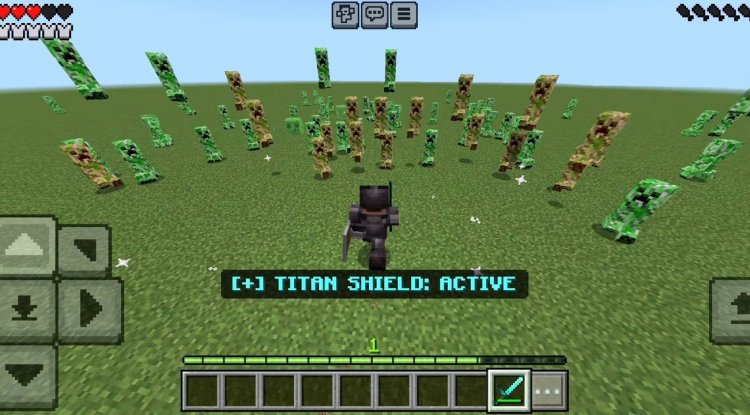
AFK farms — Mob grinders and item farms that run while you're away tend to create massive entity pileups. Lag Shield's farm detection and emergency cleanup prevents these from completely tanking your server.
Long-running worlds — After weeks or months of play, even single-player worlds accumulate enough loose items and stuck mobs to cause noticeable lag spikes. Regular automatic cleanup prevents this degradation.
Best MCPE Addons 2026: Why Lag Shield Deserves Your Attention
The addon landscape in 2026 is more crowded than ever, with new performance tools and quality-of-life mods releasing constantly. Among the best Minecraft addons available, Lag Shield stands out because it solves a problem that most players face but few addons address directly.
Unlike addons that add content (new mobs, blocks, items), Lag Shield improves the foundation that makes every other addon playable. If your world is running at 8 TPS because of entity buildup, no new feature addon is going to feel good. Lag Shield fixes that first.
The addon is actively developed by Relyz, with version 1.0 as the current release and ongoing improvements planned. The creator has focused on stability and compatibility, which means it plays nicely with other quality addons rather than conflicting with them.
What Lag Shield Cannot Do (Important Limitations)
It's worth noting what Lag Shield doesn't address, so you have realistic expectations:
The addon cannot optimize chunk generation speed, meaning if your world is laggy specifically because of terrain generation, Lag Shield won't help. Similarly, it doesn't detect or prevent lag caused by redstone contraptions or hopper chains—these require manual optimization on your part.
Lag Shield is targeted squarely at entity-based lag, which is the most common cause in modded worlds, but it's not a magic bullet for all performance problems.
How to Install Lag Shield on Your World
Installation is straightforward and requires no special configuration:
- Download the Lag Shield .mcpack file (only the world host needs it installed)
- Open the file, and Bedrock Edition will automatically import it into your installed addons
- Create or open your world, go to world settings, and enable Lag Shield under "Behavior Packs"
- Load into your world and you'll see the TPS display and performance monitoring activate immediately
- Customize settings in-game using the built-in configuration menu—no file editing required
The best part: only the world host needs to have the addon installed. Other players joining your world will still benefit from the lag prevention without needing to download or enable anything themselves.
Frequently Asked Questions About Lag Shield
Does Lag Shield work on multiplayer servers?
Yes. Only the world host needs to install it, and all connected players automatically benefit from the lag prevention and performance improvements. It's ideal for Realm servers and local multiplayer worlds.
Will Lag Shield delete items I care about?
No. The addon has a comprehensive item protection system that never deletes netherite, diamond gear, shulker boxes, elytra, totems, tridents, enchanted books, or any named items. Only junk—dropped sticks, experience orbs, arrows—gets cleaned up.
Can I customize how often Lag Shield cleans up entities?
Completely. The cleanup interval and item cap are both configurable in-game without touching any files. Settings save per world, so you can have different cleanup schedules for different worlds.
Does Lag Shield slow down my game with its monitoring features?
No. The addon is only 10 KB and uses stable APIs with minimal overhead. The performance monitoring itself uses negligible resources—the real performance gains come from the cleanup preventing lag, not from the addon's code itself.
What's Your Reaction?













![Patrix Resource Pack For 1.19 [32x→256x]](https://minecraftmodded.com/uploads/images/202210/image_750x415_6343b3ab59eff.jpg)


